Well Properties
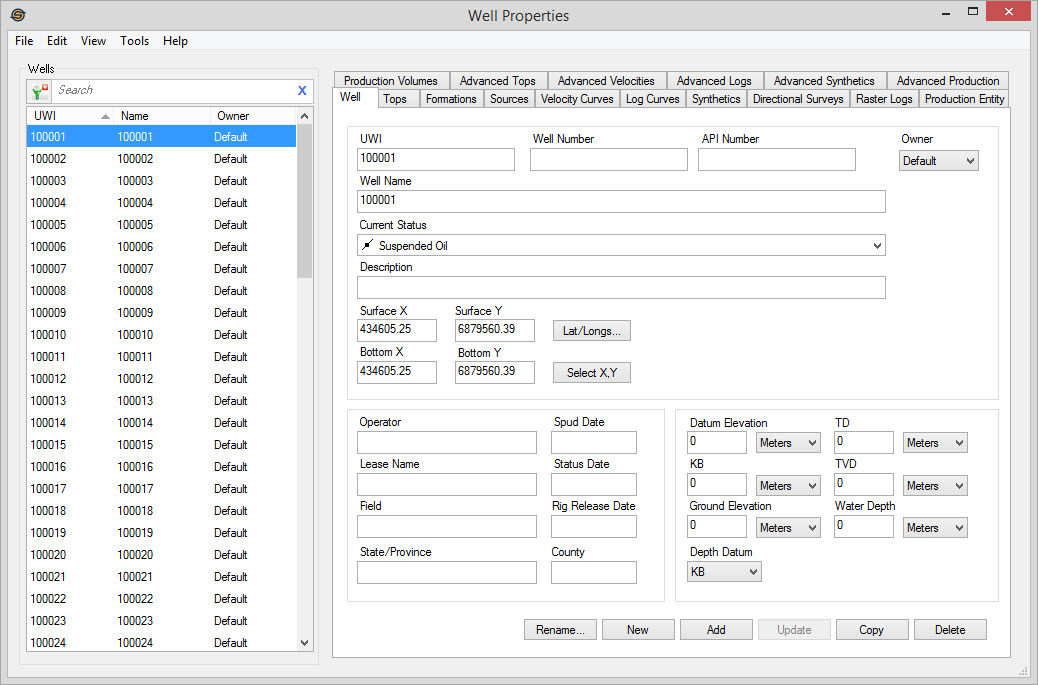
The Well Properties dialog allows you to see a list of all of the wells in your project, and the information associated with each well. From here you can add, delete and edit well information, copy well information between wells, and perform batch operations on your well information.
The Well Properties dialog is made up of:
General Information
Wells List
The Wells list allows you to see all of the wells in your project. This list is usually populated from a single file using the Well Import Wizard. After selecting a well from the list, the information associated with that well will be available on the tabs.
Tabs
Each tab in the Well Properties dialog is populated with the information associated with a single well selected from the Wells list, or with well information applicable to the entire project. When you open the dialog for the first time you will see the following tabs:
- Well Tab
- Tops Tab
- Formations Tab
- Sources Tab
- Velocity Curves Tab
- Log Curves Tab
- Synthetics Tab
- Directional Surveys Tab
- Raster Logs Tab
- Production Entity Tab
- Production Volumes Tab
The advanced well tabs can be turned on by selecting Show Advancedfrom the View menu of the Well Properties
dialog. These are:
- Advanced Tops Tab
- Advanced Velocities Tab
- Advanced Logs Tab
- Advanced Synthetics Tab
- Advanced Production Tab
Menus
The menus are available to help you make well selections, change the
appearance of the dialog, access help information, and close the dialog.
Also See
— MORE INFORMATION

|
Copyright © 2020 | SeisWare International Inc. | All rights reserved |