Culture Clear
The Culture Clear dialog allows the user to clear portions of culture data contained within the selected polygons. Note: If there are no polygons selected you cannot perform the operation.
 How do I clear culture?
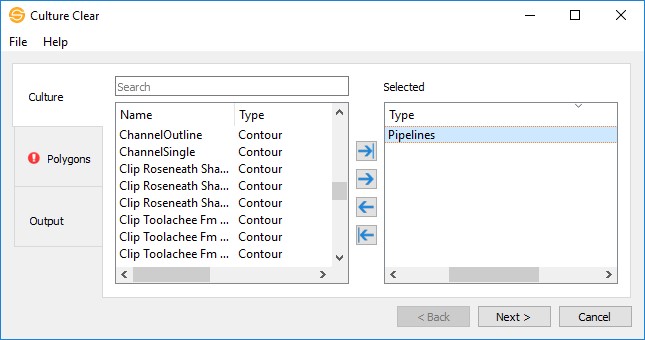
1) Select the Culture that you want cleared. by selecting it in the list and pushing it over to Selected.
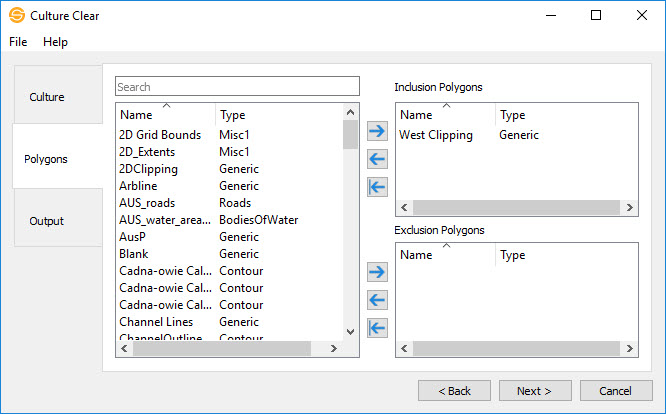
2) Specify the polygon(s) you’d like to clear with.
3) Click Finish to clear the culture(s).
General Information
Culture
Select the culture layer that you want to clear. Left click to select a culture layer, or use the Ctrl key on your keyboard to select multiple culture layers, and then use the selection arrows to move the culture layers to the Selected list. You can also move a single culture layer to the Selected list by double-clicking on it.
Polygons
Constraining polygons are often used in SeisWare applications to limit the geographical extents of the data being used in an operation. A polygon is considered to be any closed culture layer. For example, it may be a land boundary, or a closed contour.
Inclusion Polygons
This area will display a list of culture layers to be used as inclusion polygons in the clearing operation. Any data within your inclusion polygon will be cleared.
Exclusion Polygons
This area will display a list of culture layers to be used as exclusion polygons in the clearing operation. Any data within an exclusion polygon will not be cleared.
Output
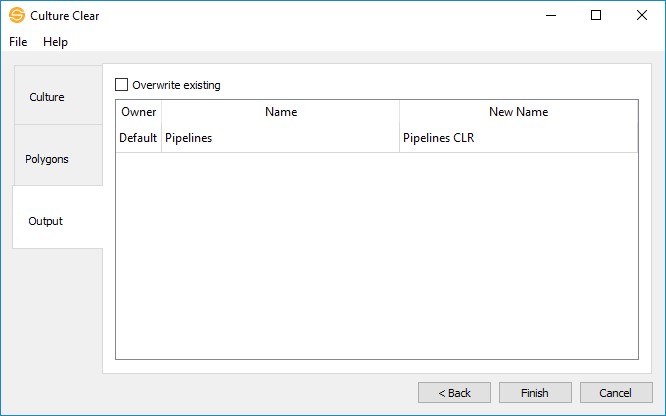
The Output page allows you to change the output name(s) for the culture layer(s). By default, the new culture layer will have *CLR appended to the name. You also have the option to overwrite the culture layer if it already exists.
File Menu
Exit: Exit the application.
Help Menu
Help: Access the help information for the application.
About: View information about the application.
— MORE INFORMATION

|
Copyright © 2020 | SeisWare International Inc. | All rights reserved |