Field Development Tool: Data Service Configuration
The SII Data Service Configuration dialog box is used to configure the messaging server, configure the data server and attach to existing projects.
Messaging Server Tab

The Messaging Server Tab is used to configure the messaging server.
Messaging Server Name: The name of the messaging server.
Messaging Server Port: The server port. This port is used for sending and receiving messages to other users in the project when changes to data are made.
Server Broadcast Port: The broadcast port number. Note: If this number is changed, other users must change their broadcast port number to match or they will not be able to see the server.
Messaging Server Status: Shows the messaging server status and whether it is running or not.
Connection API Status: Shows the API connection status and whether it is reachable or not.
Projects Tab
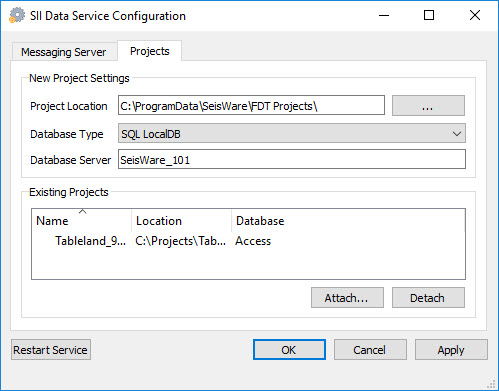 The Projects tab displays a list of projects currently being hosted on the server.
New Project Settings
Project Location: Specify the location of any new projects that are created by a user that will reside on this server.
Database Type: Specify the database type for any new projects that are created by a user.
Database Server: The name of the SQL Server that should be used for SQL Server projects.
Existing Projects
Attach: Associate an existing project with the SeisWare Data Server. After clicking  , select the project folder in thebrowing window and click
  . Note: Attaching a project to a server means that all users that have access to the server will have access to the project.
 Detach: Remove the project from the server. Users will no longer be able to access the project when they access the server. Note: Detaching a project from the server doesn't delete any project files. You must manually delete the project and associated project files.
— MORE INFORMATION

|
Copyright © 2020 | SeisWare International Inc. | All rights reserved |