Well Zone Generator
The Well Zone Generator application allows you to bulk create zones for a well or groups of wells in your project.
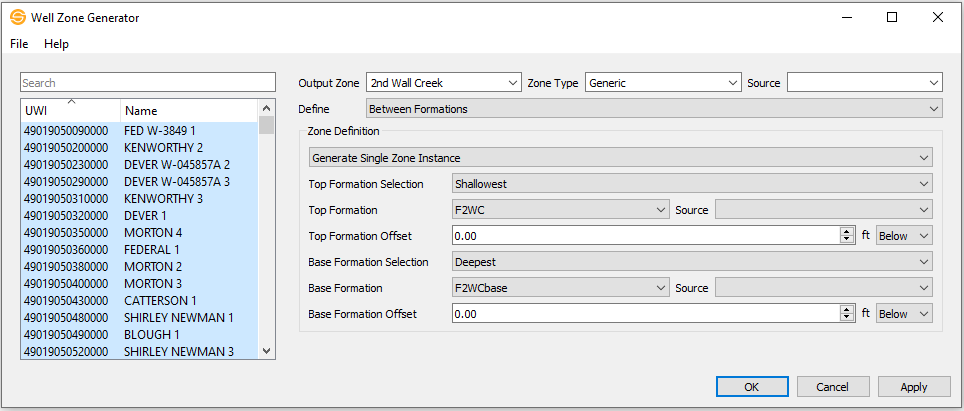
General Properties
Output
Output Zone: Select the name of an existing zone or enter in a new zone name.
Output Zone Type: Select the name of an existing zone type or enter in a new zone type.
Source: Optionally select an existing source or enter in a new source to associate with your zone.
Zone Formation Definition
Define Choose Between Formations, Using Depth Range, or By Single Formation.
Between Formations
Top Formation Selection: Select which pick to use, shallowest or deepest, when multiple occurrences of the same top exists on a well.
Top Formation: Select the formation that defines the top of your zone.
Source: Optionally select the source to be used for your Top Formation selection.
Top Formation Offset: Define where the zone will start by specifying an offset, above or below, the formation.
Base Formation Selection: Shallowest/Deepest – when multiple occurrences of the same top exists on a well, specify which one to use.
Base Formation: name of the formation to be used to define the base of the zone.
Source: Source (optional) – source to be used to specify which formation is picked.
Base Formation Offset: The offset in depth units from the formation from which the zone will end.
Using Depth Range
Top Depth: Specify the starting depth for the top of the zone.
Base Depth: Specify the base depth for the base of the zone.
By Single Formation
Formation Selection: Shallowest/Deepest - when multiple occurrences of the same top exists on a well, specify which one to use.
Formation: Name of the formation to be used to define the zone.
Source: Optionally select the source to be used for your Formation selection.
Formation Offset: Specify an offset above or below the formation that will be the mid point of the zone. For example, a top that is at 2500 m with an offset of 100 m above the formation will have a mid point of 2400 m.
Formation Window: Specify the depth window of the zone. Note: this window will be divided above and below the mid point of the zone. For example, if you mid point is at 2500 m with a formation window of 1000 m, the zone will start at 2000 m and end at 3000 m.
File Menu
Help Menu
Help: Opens the Help files for the Well Zone Generator dialog.
About: Provides general information about the current version of the Well Zone Generator application.
— MORE INFORMATION

|
Copyright © 2020 | SeisWare International Inc. | All rights reserved |