Extract Keywords to Horizon
The Extract Keywords to Horizon dialog allows you to extract keywords from the trace headers within SEG-Y seismic files and outputs a horizon. This is useful if keywords such as elevation or fold were loaded with the data so they can be viewed on the map.
 How extract a keyword to a horizon?
-
Select the Keywordsto be extracted.
-
Select the lines that the keyword will be extracted from.
-
Give the output horizon a suffix to be added to the keyword name and a Horizon Type. Note: To see these horizon on your Seismic Viewer, this must be set to Normal.
-
Click
 and then
  to extract the keyword.
Your horizon will now be visible in Horizon Properties,
and can be displayed on your Basemap.
General Information
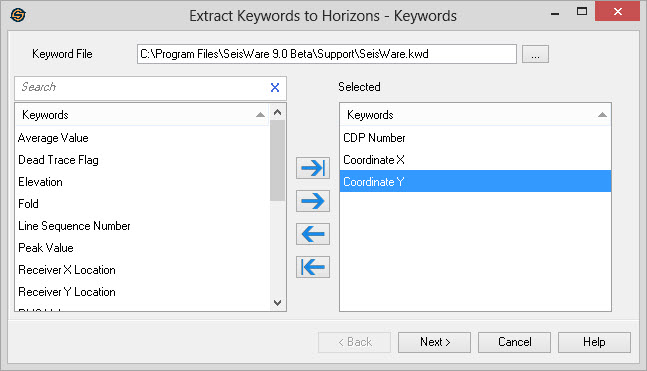
Keyword File
Click  to the select a keyword file to
use. The default
keyword file is loaded automatically, but
any previously generated keyword file may be used.
to the select a keyword file to
use. The default
keyword file is loaded automatically, but
any previously generated keyword file may be used.
Keywords List
To select the keywords to use to generate horizons from, highlight one or more keywords, and then move them to the Selected list using the selection arrows.
Extract Keywords Options
— MORE INFORMATION

|
Copyright © 2020 | SeisWare International Inc. | All rights reserved |