Well Properties: Advanced Velocities Tab
The Advanced Velocities tab allows you to activate and delete velocity curves from multiple wells in one operation.
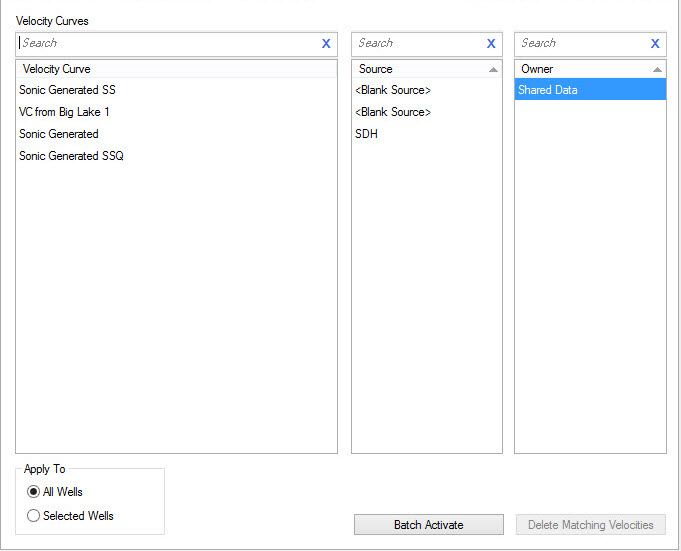
Selection Lists
Before you can delete or batch activate velocity curves you need to select values from the Velocity Curve, Source, and Owner lists. You can limit the information available in each list by typing in the search bar.
Velocity Curve:A list of the names of all of the velocity curves in the project.
Source:A list of all the sources in the project.
Owner: The owners
associated with the
project. This list is only active for users with adequate privileges.
Operations
 Batch
Activate:Select a curve from the Velocity Curve list,
select a Source, and if you have Administrator privileges, select an
Owner. The selected curve will become the active velocity curve for all
wells with a curve that matches your selections. For wells that don't
have curves with that name
associated with them, the active curve
won't change.
Batch
Activate:Select a curve from the Velocity Curve list,
select a Source, and if you have Administrator privileges, select an
Owner. The selected curve will become the active velocity curve for all
wells with a curve that matches your selections. For wells that don't
have curves with that name
associated with them, the active curve
won't change.
 Delete Matching
Velocities:Delete velocity curves matching the selected
Velocity Curve, selected
Sources, and selected Owners.
Delete Matching
Velocities:Delete velocity curves matching the selected
Velocity Curve, selected
Sources, and selected Owners.
Apply To: Specifies which wells to apply the activation and deletion to.
All wells: Delete the log curves for all wells in the database.
Selected wells:
Only
delete the log curves for wells selected in the main well list.
Note: If you
do not have adequate privileges, you cannot select from the Owner
list, and will not be able to delete log curves if they do not belong
to you, or the user you are impersonating.
Well Properties Tabs
— MORE INFORMATION

|
Copyright © 2020 | SeisWare International Inc. | All rights reserved |