Graph Horizons: Flatten Horizon
Use the Horizon Flattening dialog to select a horizon to flatten on.
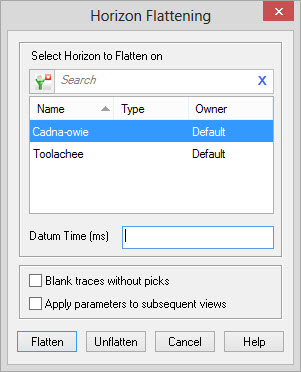
Horizon Selection
Select the Horizon to Flatten on:Select
the horizon you want to use to flatten your display.
To help you make your horizon selection, you can left click on the
column header
to sort any of the columns, you can apply a filter ( ),
or you can type a search string into the search
bar to limit the list based on Name,
Type,or Ownerinformation.
),
or you can type a search string into the search
bar to limit the list based on Name,
Type,or Ownerinformation.
Datum Time:Specify a reference datum time
for the flattened horizon.
Horizon Flattening Parameters
Blank Traces Without Picks:If this is turned on, traces located where there is no associated horizon pick will have the value 0. If it is not set, traces without picks will be referenced against the datum time. For example, if there is no horizon pick at a given trace, and the datum time is 600, trace values will be extracted above and below the 600 ms point of the data.
Apply parameters to subsequent views: If this is turned on, your choices will be saved until the next time you open the dialog.
Horizon Flattening Operations
Flatten:Display the graph with the flattened horizon.
Unflatten:Display the graph with the normal horizon.
Also See
— MORE INFORMATION

|
Copyright © 2020 | SeisWare International Inc. | All rights reserved |