Fault Export
The Fault Export application allows you to export faults to an ASCII file.
 How do I export a fault?
-
Select the faults for export from the Faults list. Use the Ctrl key to select multiple faults.
-
Select the Output Format.
-
Specify the Name of the Output File. Note: The default location is the project folder. This can be changed by clicking
 .
. -
(Optional) Turn on Apply bulk shifts.
-
(Optional) Turn on Export depth faults as subsea.
-
(Optional) Click
 to set constraining
polygons.
to set constraining
polygons. -
Click
 to export the faults.
General Information
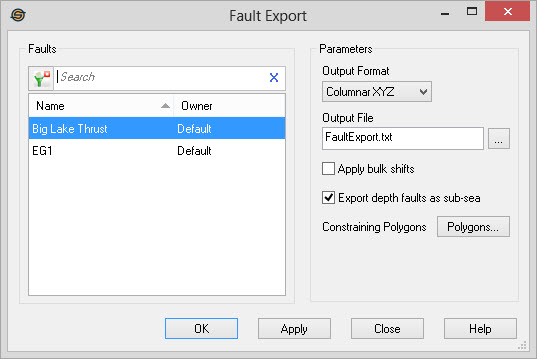
Select Faults
Select the faults you want to export from the list. Left click to
select a fault, or use the Ctrl
key on your keyboard to select multiple faults. To help you make
your fault selections, you can sort any column by left clicking
on the column header, you can apply a filter ( ), or you can type a search string
into the search
bar to limit the list using Name,
or Owner information.
), or you can type a search string
into the search
bar to limit the list using Name,
or Owner information.
For additional selection and navigation options right click on the Faults list to access the shortcut menu.
Parameters
Output Format: Select the text format for export.
- Columnar
XYZ: This will output a comma
delimited file
of fault
segments.
- Photon ASCII: This will output
a self describing ASCII file suitable for input into SeisX.
- GeoFrame
ASCII:This will output
a ASCII file suitable for input into GeoFrame.
Output File:
Specify the name
of the output file. You can select
an
existing file by clicking .
Apply bulk shifts: Add the bulk shift of the working set version of the seismic line to time values before output. Normally the bulk shift is not applied to the faults.
Export depth faults as subsea: Turning this on will export depth faults using subsea values. When this is not on, depth faults are exported using true vertical depth. Note: When this item is turned on, Apply bulk shifts is ignored. Bulk shifts will always be applied to subsea fault exports.
Constraining
Polygons: Opens
theSelect Polygonsdialog to select a constraining
polygon to limit the extents of the fault export operation.
Also See
- Sample Fault Export Files
— MORE INFORMATION

|
Copyright © 2020 | SeisWare International Inc. | All rights reserved |