Well Zone Exporter
The Well Zone Exporter window allows you to export zones and zone attributes for selected wells in your project to a *.csv file. Note: The dialog will automatically filter your wells to show only wells that have zones and zone attributes.
General Properties
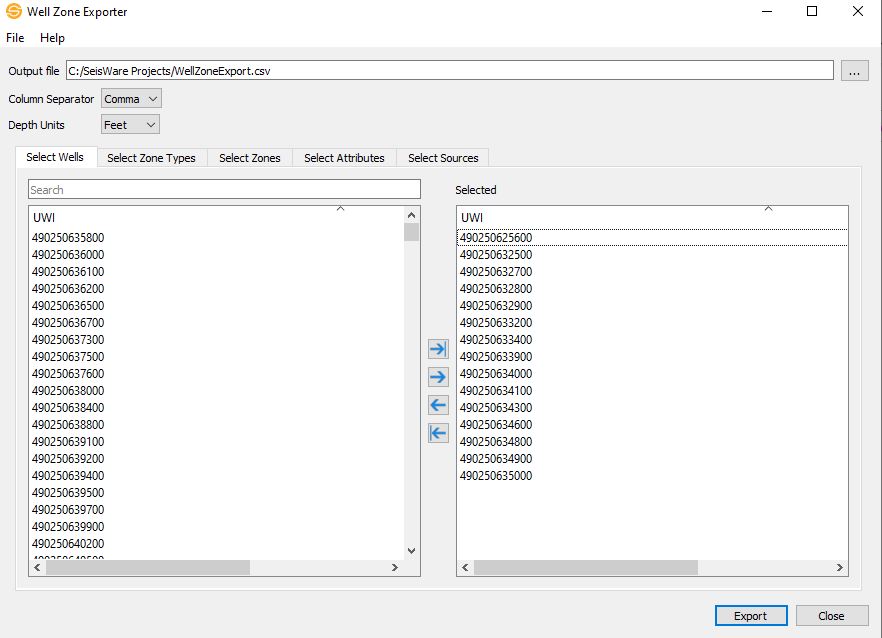
File Parameters
Output File: Enter
the name and destination of the export file. The
default location for the file will be in the project folder. Click  to select a destination file to
overwrite.
to select a destination file to
overwrite.
Column Separator: Specify the character delimiter.
Comma: Columns are separated by the comma "," character.
Tab: Columns are separated by the tab character.
Depth Units: Choose between feet and meters for your depth units.
Tabs
Select Wells: Select which wells you want to export zones and/or zone attributes for.
Select Zone Types: Select which zone types you want to export.
Select Zones: Select which zones you want to export.
Select Attributes: Select which zone attributes you want to export.
Select Sources: Select which sources you want to export zones and zone attributes from.
Note: All the tabs are optional. For example, if nothing is selected, then all the zones and zone attributes for all the wells are exported.
File Menu
Exit: Exit the Well Zone Export dialog.
Help Menu
Help: Opens the Help files for the Well Zone Exporter dialog.
About: Provides general information about the current version of the Well Zone Exporter application.
— MORE INFORMATION

|
Copyright © 2020 | SeisWare International Inc. | All rights reserved |