Data Pipeline: Culture
The Culture page allows you to select which culture features will
be
retrieved. Use the "==>" button to
move any selected item from the all features list to the list of
features to be retrieved. Use the "<==" button to remove any
selected items from the list of features to be retrieved list. Double
clicking on a feature
in the list of all features will move it to the features to be
retrieved list. Double clicking on a
feature in the features to be retrieved list will remove it.
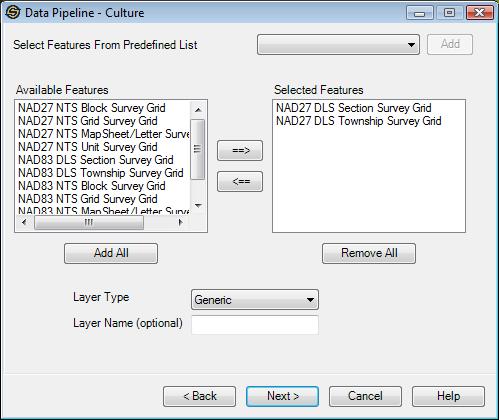
Select Features From Predefined List: Use this option to quickly select culture features from a predefined list. Select the predefined list and the press the "Add" button to add these features into the selected features list.
Add All: Use this button to move all of the culture features to the features to be retrieved list.
Remove All: Use this button to remove all of the culture features currently in the list of features to be retrieved.
Layer Type: Specify the type of layer for the new layer(s). When retrieving features into multiple layers, only one layer type can be selected for all of the new layers.
Layer Name: This is optional. If a layer name is specified, then all of the
features in the features to be retrieved list
will be put into one layer. If the layer name is blank, each culture
feature will be put into its
own layer with a default name.
Note: Depending on the Data Source selected and the Data Types to import not all pages may appear.
— MORE INFORMATION

|
Copyright © 2020 | SeisWare International Inc. | All rights reserved |