Grid and Contour
The Grid and Contour application allows you to grid seismic and well data, as well as XYZ data stored in a Columnar ASCII format. You can also generate contours, and create trend and residual maps.
 How do I create a grid and contour using the grid and contour wizard?
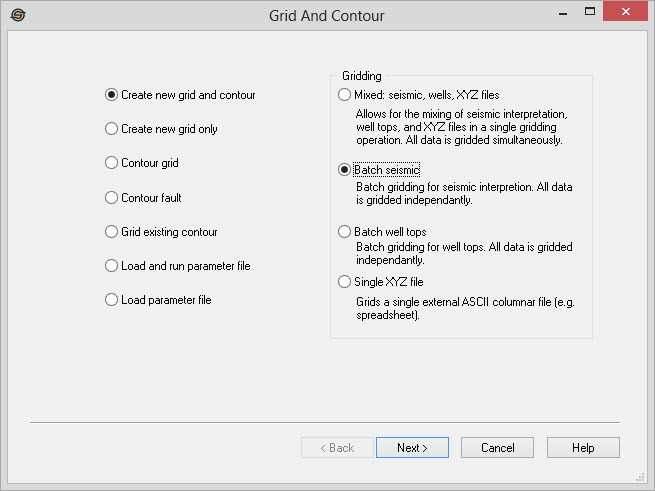
- Select the operation:
- Create New Grid and Contour
- Create New Grid Only
- Contour Grid
- Contour Fault
- Grid Existing Contour
- Load and Run Parameter File
- Load Parameter File
-
Select the data to grid:
- Mixed: seismic, wells, XYZ files, Allows for the mixing of seismic interpretation, well tops, and XYZ files in a single gridding operation. All data is gridded simultaneously, and there will be one output grid.
- Batch Seismic: Batch gridding for seismic interpretation. All data is gridded independently. For example, if multiple input horizons are selected, you will have multiple output grids.
- Batch Well Tops: Batch gridding for well tops. All data is gridded independently. For example, if multiple input formations are selected, you will have multiple output grids.
- Single XYZ
File: Grids a single external ASCII columnar file (e.g. a
spreadsheet).
-
Select the Seismic Lines and Horizons. Each selected horizon from every selected seismic line will be used in the gridding process.
-
Select the Well Tops and Sources. This page will appear if Mixed or Batch Well Tops was selected. The tops used in the gridding operation will be filtered based on the source selection.
-
Select the XYZ Columnar ASCII file. This page will appear is Mixed or Single XZY File was selected. The data stored in the ASCII file will be used in the gridding process.
-
Select the Gridding Technique. This is the algorithm that will be used to grid the data.
-
(Optional) Select the Restricting Polygons to use. This will allow you to specify the polygon to clip the data to. Move the polygon under 'Inclusion' for areas to use to grid and 'Exclusion' for areas to omit.
-
Select the Grid Extents. Either select an existing grid to match, specify the bin size or the number of bins to use, or enter in the X, Y's.
-
(Optional) If a gridding technique that supports anisotropy was selected (such as kriging or minimum curvature), set the Anisotropy and Search Options.
-
(Optional) Select the Grid Residuals to create and attach a surface trend and/or a residual.
-
Select the Contour Extents. Compute the extents of the selected data and optionally change the minimum or maximum values used.
-
Select the Contour Interval. Specify the contour interval, the labeling interval and the size and font for the contours.
-
(Optional) Save the Parameters. Save the parameters used for the operation so that the grid can be replicated at a later date.
Grid and Contour Operations
— MORE INFORMATION

|
Copyright © 2020 | SeisWare International Inc. | All rights reserved |