Generate Synthetic
The Generate Synthetic application allows you to generate synthetics and save them to the database from it's own module. You can also generate synthetics interactively within the Seismic Viewer and in the Log Editor.
 How do I generate a synthetic track?
-
Select the well from the Well List. Note: You can do this from the list, or by clicking on the well symbol in the Seismic Viewer or on the Basemap.
-
Select the Curve Inputs. Note: As a minimum, you will need a Sonic curve and a Velocity curve.
-
Set your Wavelet Parameters. All parameter changes are reflected in the image as they are updated on the fly until the synthetic is saved.
-
Set the Output Options to be used when saving the synthetic to a SEG-Y file. Note: Once you save this synthetic, the synthetic cannot be changed. To make changes you will need to create a new synthetic or overwrite the existing synthetic.
-
Select to either insert the synthetic into the seismic or overlay the synthetic on top of the seismic data.
- Click
 to save to database and close the
dialog.
to save to database and close the
dialog.
General Information
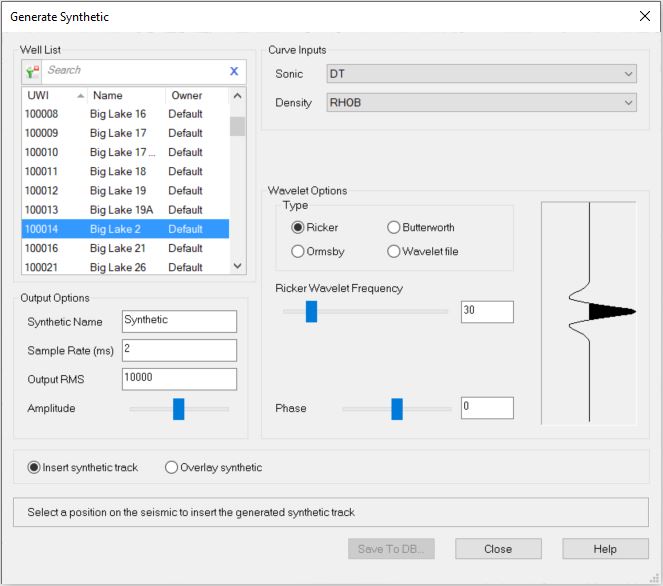
Well List
Select a well to generate the synthetic. Left click to select a
well, or click on the well symbol on the
Basemap or in the Seismic Viewer.
To help you make your well selection, you can sort any column by left
clicking
on the column header, you can apply a filter ( ), or you can type a search string
into the search
bar to limit the list using UWI,
Name, or Owner
information.
), or you can type a search string
into the search
bar to limit the list using UWI,
Name, or Owner
information.
For additional selection and navigation options right click on the Well List to access
the shortcut
menu.
Output Options
Synthetic Name:
This is
the name the synthetic will have when written to the database.
Sample Rate: The sample
rate, in milliseconds, for the output synthetic.
Output RMS: Specifies
an output RMS value for the generated synthetic. This allows you to
balance the data with the existing seismic in your project.
Amplitude:Adjust
the
slider to increase or decrease the amplitude of the data relative to
the seismic.
Curve Inputs
The Sonic and Density fields will populate if there is an available curve.
Sonic: Use the default sonic curve, or select a curve from the drop down list. Curves in the list can be sorted by clicking on the column headers, and limited by typing a search string into the search bar.
Density: Use the default density curve, or select a curve from the drop down list. Curves in the list can be sorted by clicking on the column headers, and limited by typing a search string into the search bar. If the well has no density curve density values will be calculated using Gardner's equation. To remove the density curve select Clear Selected Items from the drop down list.
Wavelet Options
Select your wavelet and adjust the parameters. Available
wavelets are:
— MORE INFORMATION

|
Copyright © 2020 | SeisWare International Inc. | All rights reserved |