Well Seismic Intersections (coming soon)
Well Seismic Intersections is an application that allows you to extract seismic data at a well location, and export the data to a file. You can extract single values, or a series of values within a specified window.
 How do I extract seismic data at well locations?
-
Select the Well(s) to use. Individually select wells, or interactively select well from the Basemap.
-
Select the Seismic to use.
-
Specify options for extraction.
-
Set the Output Options
General Information
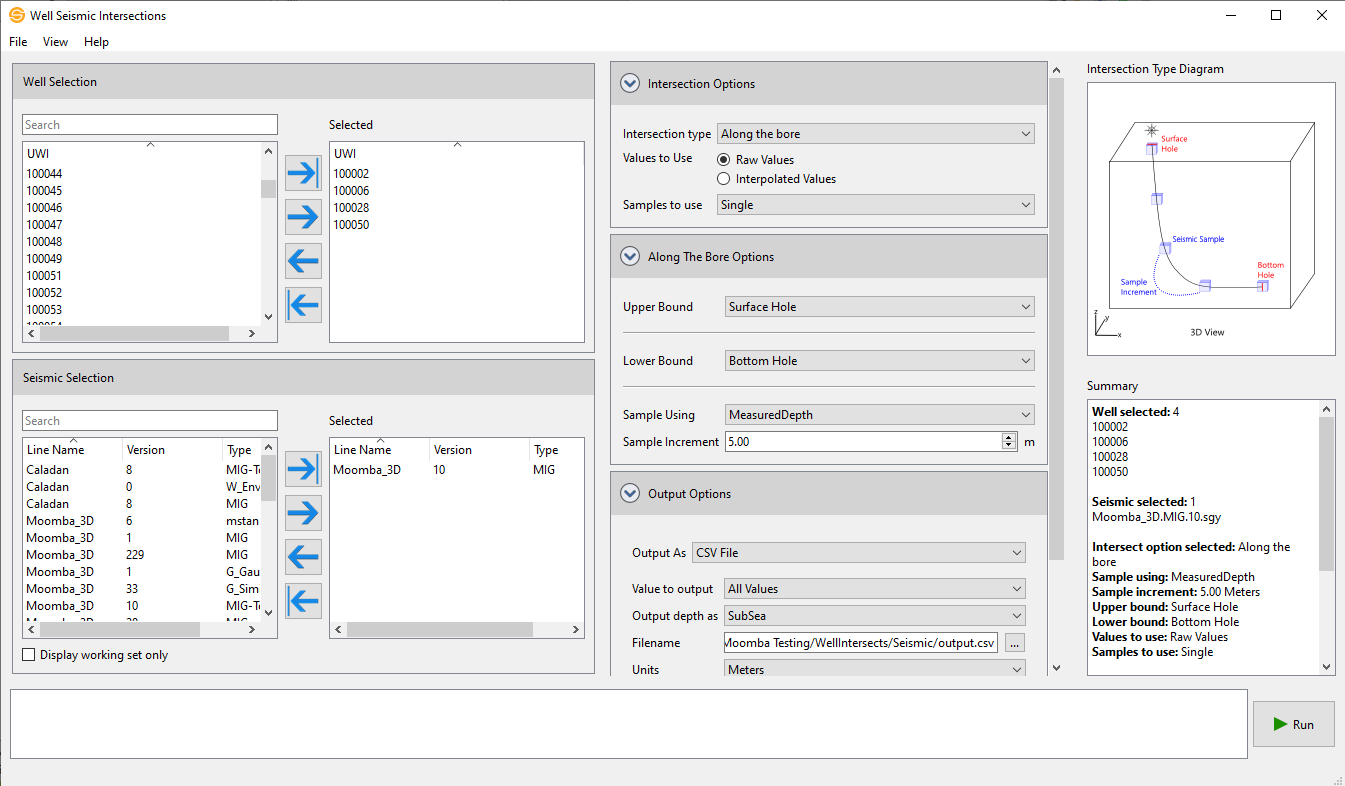
Wells
Select the wells that you want to use to extract data. Left click to select a single well, or use the Ctrl key on your keyboard to select multiple wells, Alternately, you can move a single well to the Selected list by double clicking on it, and move a group of wells by selecting them from the Basemap.
Seismic Selection
Select the seismic that you want to use to extract data. Left click to select a single line or use the Ctrl key on your keyboard to select multiple lines. Display Working Set can be toggled to display only the working set of each seismic line.
Intersection Options
Intersection Type: This is the type of intersection that you wish to perform. Selecting one of the types will update the Intersection Type Diagram to provide an schematic of what type of intersection will be found. Note: this diagram does not reflect the actual data selected, and is for illustration purposes only. Certain Intersection types will have additional options that need to be specified.
The types are:
Along the bore: Uses a range of evenly spaced points that are specified along the well path in MD. For each point, the XY of that point is used to find a value from the seismic to be extracted. Additional parameters need to be defined in the Along The Bore Options:
With a formation top: Uses the XY location of formation top and then extracts the value of the seismic at that XY location. Additional parameters need to be defined in the Top Extraction Options:
Values to Use:
Samples to Use:
Output Options
You can output the extracted value as a .CSV file, a Formation Top or a Log Curve. The allowed types will change based on the Intersection Type that is initially selected.
Value to output: When you specify an intersection type that would output more than one value (e.g Along the Bore), you can choose to get each extracted value output using All Values. You can also chose to apply a mathematical operator to this group of values and get a single value result. Operators available are Average, Median, Minimum, Maximum and Sum.
Output depth as:Specify whether to output depth units in TVD or in SubSea.
.CSV File specific options:
Formation Top specific options:
Log Curve Specific options:
Intersection Type Diagram
This is for illustrative purposes only and aims to shows how the intersection is found for the various Intersection types. This can be enabled/disabled under the View menu. Note: not all options specified will be displayed on this (for example, sample options are not shown).
Summary
This is a text summary of the paramters that are being used in the run. You can highlight and copy this text if needed (but cannot save directly to a file at this time). The view can be enabled/disabled under the View menu.
Other Well Intersections (and maybe deprecated one? links?
— MORE INFORMATION

|
Copyright © 2020 | SeisWare International Inc. | All rights reserved |