Inter-well Pick Properties
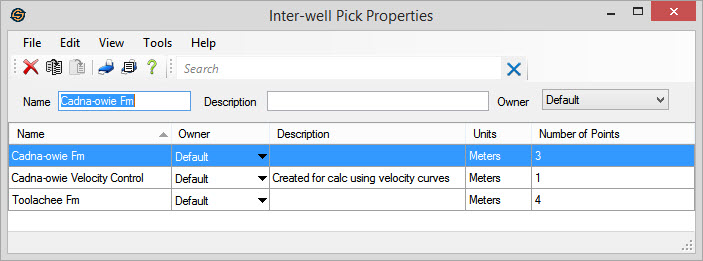
The Inter-well Pick Properties window displays a list of formations for which inter-well picks exist. You can copy, paste, rename, and delete groups of inter-well picks from this window.
Inter-well picks are created in the Edit Velocity Grid window, which can be opened after performing a calculation in the Velocity Modeling application. These inter-well picks are used to influence your grid in areas of sparse well control. Note: You can only delete individual inter-well picks from the Edit Velocity Grid window. In the Velocity Modeling application, after creating a layer using the corresponding formation top, from the Layer Details dialog box, turn on Use inter-well picks. After running the calculation, click  . From the data table, select the inter-well picks you want to delete, and click
  .
.
The Inter-well Pick Properties window has menus, toolbars, and a table that displays a list of formations for which inter-well picks exist:
General Information
Columns
Name: The formation name of the group of inter-well picks. Because of how inter-well picks are created and used, names should match an existing formation name in your project, and should not be changed. Inter-well formation names do not have to match an existing formation in your project only when you are generating your depth grids using velocity curves.
Owner: The owner of the inter-well picks.
Description:A user supplied text description for the inter-well picks. These can only be added from this window, and not when the picks are created.
Number of Points: The number of inter-well picks associated with a group of inter-well picks.
Also See
— MORE INFORMATION

|
Copyright © 2020 | SeisWare International Inc. | All rights reserved |