Fault Properties
The Fault Properties window allows you to view a list of faults that are associated with your SeisWare project, and edit the properties of the faults.
The Fault Properties window has menus and toolbars to help you accomplish these tasks:
General Information
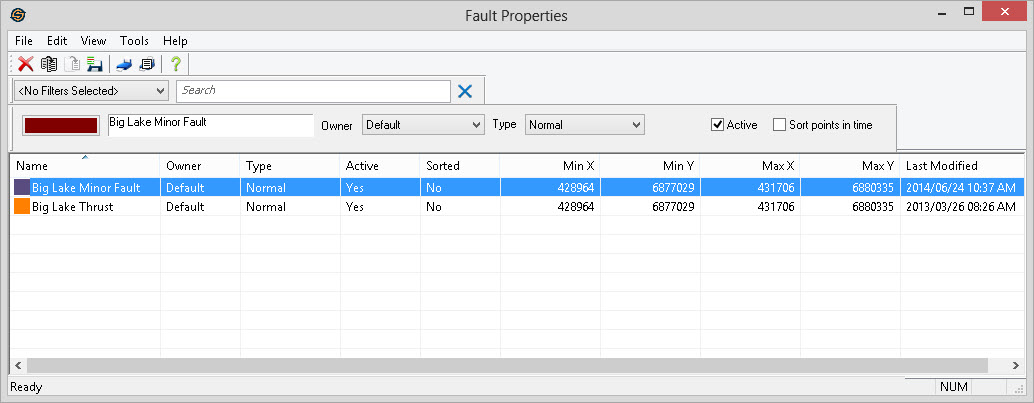
Main Area
Fault properties are arranged in columns like the other
properties
dialogs. You can sort these columns by clicking on the column heading
and you can re-order them by dragging and dropping the column. Access
functionality by right clicking in the table area, or from the main menus
or using the toolbars
above.
Columns
Name: Includes the name and color of the fault.
Owner: The owner of the fault.
Type: Includes the type of the fault. Types are Normal, Overthrust and Unassigned. Unassigned faults are excluded from such operations as triangulation.
Visible: Indicates whether the fault is currently visible on the seismic display.
Active: Indicates whether the fault is currently active. Faults that are not active will not appear in dialogs. Making faults inactive will help to reduce clutter in projects with many faults.
Sorted: Indicates whether the nodes of a fault segment are always sorted in time. When set this prevents a user from picking a fault segment that dips and rises in time. This can often make picking segments easier.
Min X: The minimum x (east/west) extent of the fault.
Min Y: The maximum y (north/south) extent of the fault.
Max X: The maximum x (east/west) extent of the fault.
Max Y: The maximum y (north/south) extent of the fault.
Last Modified: The last modified date of the fault file. More specifically, this will be the last time that any node was modified in the fault. If the fault has no nodes this will show up as "n/a".
Also See
— MORE INFORMATION

|
Copyright © 2020 | SeisWare International Inc. | All rights reserved |