Session Properties
Use the Session Properties dialog to open a session or to view or
modify the properties
for any session.
- You can open a session by:
- Highlighting the session and then clicking on the Open icon
- Highlighting the session and selecting Open from the File menu
Session Properties is made up of:
General Information
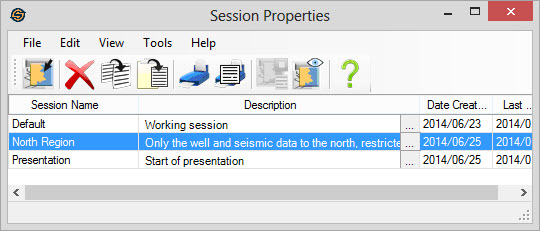
Main Area
When you open a session, this window, the Session Properties application will exit. You can sort either ascending or descending by clicking on the column header.
Session Properties Columns
Session
Name: Specifies the name of
the session. You can modify the
name of the session by clicking once to highlight the row and then a
clicking a second time to highlight the session name and then typing
the new session name you would like to
use.
You can also select Rename from the Edit Menu
Description: An optional description for the session. The description will appear in the open session application. You can leave this field blank. You can edit this value by clicking .
.
Date Created:This is the date that the session was created. This value cannot be changed.
Last Updated: This indicates the last date that the session was modified. This value cannot be changed.
Description: An optional description for the session. The description will appear in the open session application. You can leave this field blank. You can edit this value by clicking
.Date Created:This is the date that the session was created. This value cannot be changed.
Last Updated: This indicates the last date that the session was modified. This value cannot be changed.
Also See
— MORE INFORMATION

|
Copyright © 2020 | SeisWare International Inc. | All rights reserved |