Raster Properties
The Raster Properties dialog allows you to view and manipulate the properties the raster images in a project. You can also reposition the image in the Change Raster Size / Location window.
The Raster Properties is made up of:
General Information
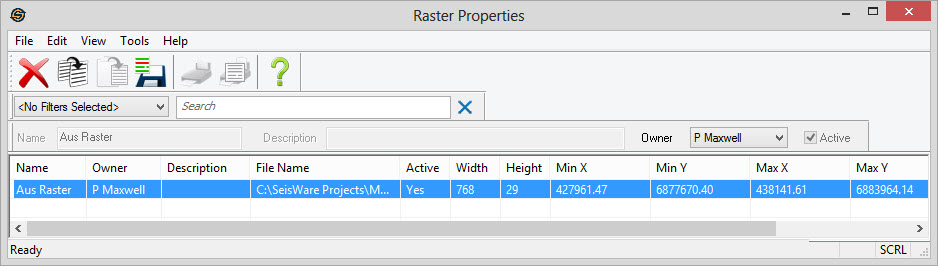
Main Area
Raster
image properties are arranged in columns like the other properties
dialogs.
You can sort these columns by clicking on the column heading and
can re-order them by dragging and dropping the column. You can
access tools by right clicking in the table area, or from the main menus or using the toolbars
above.
Columns
Name:Name of the raster image.
Owner: The owner of the raster file.
Description:A description of the raster image.
File Name:The file location associated with the image.
Active:A
flag indicating
whether the raster image is active or
not.
Inactive images will not appear in the layer list of the map, but are
still contained within the project.
Width: The width in pixels of the image.
Height:The height in pixels of the image.
Min X: The minimum X coordinate of the image. This will be the left side of the image.
Min Y:The minimum Y coordinate of the image. This will be the bottom side of the image.
Max X:The maximum X coordinate of the image. This will be the right side of the image.
Max Y:The maximum Y coordinate of the image. This will be the top side of the image.
Last Modified:The last
modified date of the actual raster file.
Also See
— MORE INFORMATION

|
Copyright © 2020 | SeisWare International Inc. | All rights reserved |