Import Culture
Culture Import is a wizard-based application used to import culture layers. As you work through the wizard, the options and pages will change depending on the file type you are importing.
 How do I import culture?
-
Select the Import Files and specify the Input File Type.
-
Specify the Other Parameters.
-
Select the text fields you want to import, and specify the Text Properties.
-
Specify the Coordinate Parameters, including source and destination coordinate systems.
-
Optionally limit the Extents of the layer with a polygon, or minimum and maximum X and Y coordinates.
-
Set the Layer Object Properties, including color, line width, and pattern.
- The Point Properties page will be available if the user is importing a columnar ASCII file and, on the Other Parameters page, has selected Treat as Single Points.
-
Give the layer a Name and Type and click
 to import the file.
The file will be converted to SeisWare format, and saved in the project folder. To see a list of imported culture objects, open Culture Properties from the Culture menu of the Main Launcher.
Note: A red exclamation
point ( ) on one of the steps buttons indicates that there is missing information. Click on the button to jump directly to the page, and correct or complete the information.
Import
Culture: Input Files
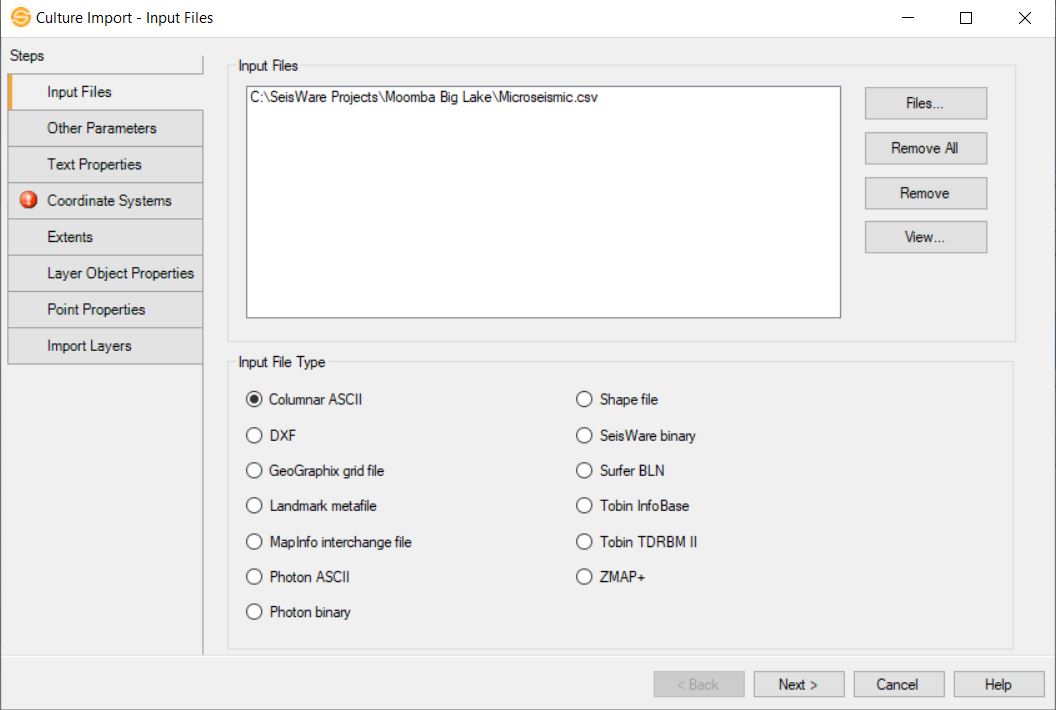
Input Files
This area displays the file or files selected for import.
 Files: Open a Windows Explorer window and select the file or files you want to import. The available files will be filtered based on the Input File Type selection. To view all available files, select All Files from the file type list.
 Remove: Remove the selected file from the Input Files list.
 Remove All: Remove all of the files from the Input Files list.
 View: Open the selected file in a text editor. This will not work for all file types.
Input File Type
Select
the type of file you want to import. If you are importing multiple files they all need to have the same format. The options on the other pages of the wizard will change depending on the type of file you are importing.
Columnar ASCII: Columnar ASCII files must contain XY or latitude/longitude information, and can optionally contain Z, segment, text, and stage information.
DXF: This is the export
format from AutoCad, and it is the standard format for culture files in many applications.
GeoGraphix
Grid file: This is a format for DLS
survey grids. It is
useful for importing DLS
survey grids from AccuMap as the text for the township/range and
section
will appear in the center as opposed to along the outside edge.
Landmark
Metafile: This
is the normal export from Landmark.
MapInfo
Interchange Files: Many government agencies
provide data in this format.
Photon ASCII: This is
the default export from SeisX.
Photon Binary: These are
the raw binary culture files from a SeisX project and can be imported directly. They have the suffix ".cult".
Shapefile: This format
is for ESRI shape files. They often have the suffix
.shp.
Many mapping applications can output data in this format.
SeisWare
Binary: This
allows you to import SeisWare binary files directly. These
files
are found in the Culture folder of a SeisWare project.
Surfer BLN: This
allows you to import Surfer BLN files directly. These
files
are blanking files that are used in Surfer when creating a grid with
faults.
Tobin InfoBase: This is an ASCII format that comes from Tobin.
Tobin TDRBM II: This is an ASCII format that comes from Tobin.
ZMAP+: This
allows you to import ASCII grid format files from ZMAP+.
Culture Import Options
- Other Parameters
- Text Properties
- Coordinate Systems
- Extents
- Layer Object Properties
- Point Properties
- Import Layers
Also See
— MORE INFORMATION

|
Copyright © 2020 | SeisWare International Inc. | All rights reserved |