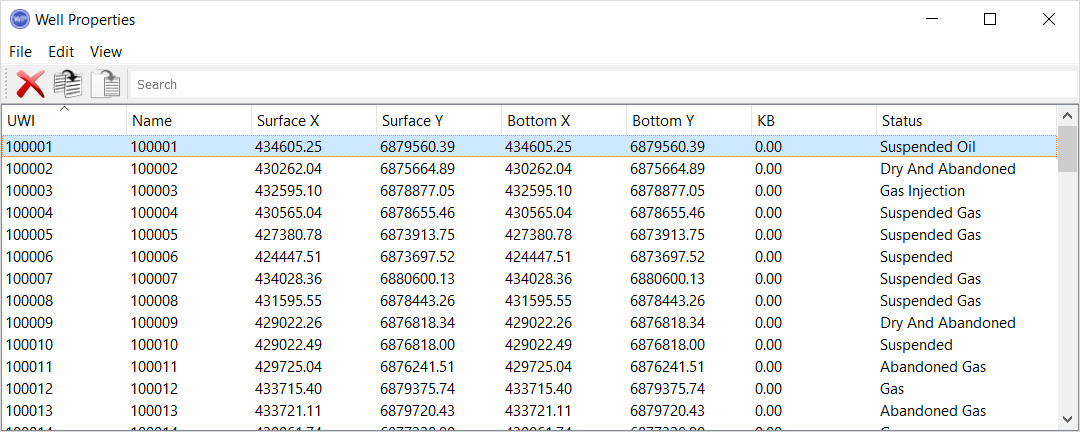
UWI: The
unique well identifier.
Name: The
common well name.
Owner: The owner of the well.
Number: The
number assigned to the well by the operator.
API Number:The unique
number assigned to the well by the American
Petroleum
Institute.
Plot Name: The name of the plot location for the well.
Description: A
description of the well. You can use this field to store
generic information about a well.
Surface X: The
easting coordinate of the top hole location of the well.
Surface
Y: The northing
coordinate of the
top hole
location of the well.
Bottom
X: The easting
coordinate of the
bottom hole
location of the well.
Bottom Y: The
northing coordinate of the bottom hole location of the
well.
Datum
Elevation: This
is the elevation that is used as the reference depth for
tops
and log curves when calculating subsea values. This will
typically be the same as the KB or Ground Elevation.
KB: The
KB elevation of the well.
Ground Elevation: The
ground elevation of the
well.
Depth Datum: This
is the elevation reference that
the Datum Elevation
refers
to. Normally this is either the KB or Ground
Elevation.
TD: The
total depth of the well.
TVD: The
true vertical depth of the well.
Water Depth: The
depth of water at the well.
Operator: The
business associate that operates the well.
Lease Name: The
name of the lease where the well is located.
Field: The
assigned field of the well.
State/Province: The
state or province the well is located in.
County: The
county the well is located in.
Spud Date: The
spud date of the well.
Status Date: The
date of the last modification for the current status.
Rig Release
Date: The rig
release date.
Current
Status: The
current status of the well. The current status determines
the
well symbol
on the map.
Left click on any column heading to sort the table using the data in that column. Right click on the column header to open the shortcut menu.  Shortcut menu options...
The menus at the top of the window contain tools to delete, copy, and paste wells and well data, and customize the appearance of the window.
File Menu: Exit the properties window.
Edit Menu: Access tools to delete, copy, paste, and select data items. Right click in the table to access these tools from a shortcut menu. See Edit menu options...
Edit Menu
 Delete: Delete the selected item(s). Note: This will permanently delete the item. To remove an item from the scene use the Data Selection dialog box.
 Copy: Copy the selected item(s).
 Paste: Paste the item(s) currently saved to the clipboard.
Select
All: Select all of the items
in the
table.
Invert
Selection: Select all of the
items in
the table that aren't currently selected, and deselect all of the items
that are currently selected.
View Menu: Turn the toolbars on and off, and select the columns to display. See View menu options...
View Menu
Displayed Columns: Open the Select Columns dialog box and place a check mark next to each column heading you want displayed.
Edit Toolbar: Turn the Edit Toolbar on or off.
Directional Survey: Open the Directional Survey dialog box to see the directional survey information associated with the selected well. Directional Survey dialog box...
Directional Survey Column Headings
Select which surface and depth units to use to display the directional survey data.
Data Point: Sequential data point number. These increase with depth.
X Offset: The X offset of the data point in the specified units measured from the top hole location.
Y Offset: The Y offset of the data point in the specified units measured from the top hole location.
MD: The measured depth of the data point in the specified units.
TVD: The true vertical depth of the data point in the specified units.
Well Tops: Open the Well Tops dialog box to see the tops information associated with the selected well. Well Tops dialog box...
Well Tops Column Headings
Select a depth reference (Sub Sea, TVD, or MD) and depth units to see information displayed for the following columns.
Formation: The name of the geological formation associated with the top.
Depth: The depth of the formation top in the specified units.
Source: The source of the formation top pick.