Field Development Tool: Project Properties
The Project Properties dialog box is used to create, attach, edit, open and delete projects. The dialog box displays a list of projects that are currently available to be opened by the user.
Note: If you are using Field Development Tool with Geology or Geophysics, this window will not be available. Please use the tools found on the Main Launcher.

 New Project: Open the Create New Project dialog box to create a new project.
 Attach Project: Open the Attach Project dialog box to create a connection to a server and attach to an existing project located on a server.
 Edit: Open the Edit Project dialog box to edit the properties of the selected project.
  Edit Project dialog box...
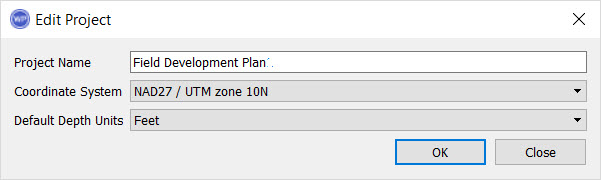 Edit Project
 Open: Open the selected project.
 Delete: Delete the selected project from the list of available projects. The project will still be hosted on the server.
— MORE INFORMATION

|
Copyright © 2020 | SeisWare International Inc. | All rights reserved |