Grid Calculator
The Grid Calculator allows the user to perform numerical computations on grids and store the result as a grid.
 How do I perform a grid calculation?
-
Set the Parameters for the calculation. Note: Unless grids were generated with the same size and geometry, you will need to turn off Use exact grids to perform the calculation.
-
Give the output grid a Name.
-
Create your expression using the Calculation box and the Grid Variables drop down.
-
Click
 to
perform
the calculation.
to
perform
the calculation.
General Information
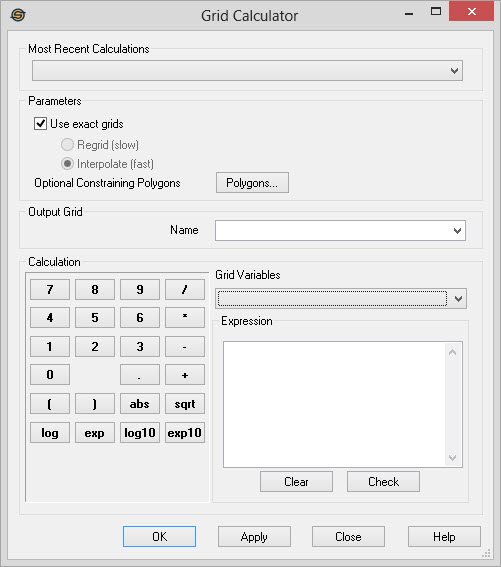
Most Recent Calculations
This drop down contains a list of
the most recent grid
calculations. Select an item from this list to quickly redo
calculations after you have regenerated grids.
Parameters
Specify additional parameters that will constrain the grid calculations.
Use Exact Grids: Turn this on to ensure that the grids in the expression match with respect to their location, size, and bin spacing. Once a grid has been selected from the Grid Variables drop down, subsequent selections from the drop down will be limited to only those grids that match the other grids in the expression. Note: If you do not see the grid you are expecting in the list of Grid Variables, ensure that Use Exact Grids is turned off.
Regrid:The calculator will determine the maximum extents of all the grids in the expression as well as use the minimum bin size of all the grids in the expression to determine the size of the resulting grid. Each grid included in the expression is then regridded to create a temporary grid for use in the calculation. The original grids are not modified. Because each grid needs to be regridded this process can take some time.
Interpolate:The calculator will determine the maximum extents of all the grids in the expression as well as use the minimum bin size of all the grids in the expression to determine the size of the resulting grid. Each grid included in the expression is then interpolated to create a temporary grid for use in the calculation. The original grids are not modified. Because interpolation is a quick process this will be much faster than the regrid option, however the results may not be as satisfactory, depending on the data.
Polygons:Click to open the Select Polygon dialog to use
a polygon to limit the geographical extents of your
calculation. Grid nodes that are not within the polygonal area
will be output as null values.
Output Grid
Name: Select the
name of a grid to
write
as the output. You can select an existing grid, or type in
the
name of a new grid.
Calculation
Use the provided keypad to type in the grid calculation.
Grid Variables: Use the drop down to enter a grid name into the expression.
Expression: Displays the final output computation expression. The expression is created by selecting Variables and from the drop down, and using the keypad to select operators and constants.
Note on operators: The operators are all unary operators. They require one value after the operator on which the operator will be performed. That value may be a grid. Thus, the expression abs "Grid A" will compute the absolute value of "Grid A". The abbreviations used are: abs (absolute value), sqrt (square root), log (natural log), exp (natural exponent), log10 (log base 10), and exp10 (exponent base 10).
 Clear: Erase the existing
expression.
Clear: Erase the existing
expression.
 Check: Performs a check to ensure
the
expression is valid. No output is created.
Check: Performs a check to ensure
the
expression is valid. No output is created.
— MORE INFORMATION

|
Copyright © 2020 | SeisWare International Inc. | All rights reserved |