Culture Properties
The Culture Properties window allows you to view and manipulate the properties of a project's culture layers. You are also able to make global changes to the entire layer from here.
The Culture Properties window is made up of:
General Information
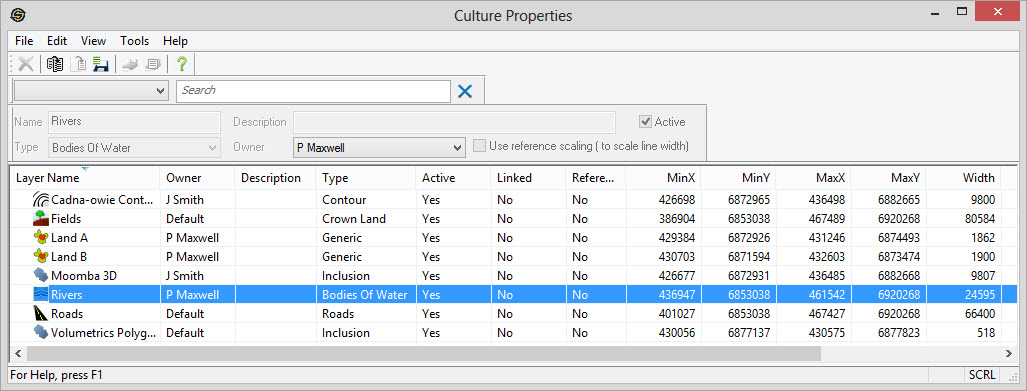
Column Descriptions
Culture properties are arranged in columns like the other properties dialogs. You can sort any column by clicking on the its heading. Most tools can be accessed by right clicking on any part of the table itself or going to the top menu. When you highlight any layer, editable properties show up in the toolbar above. To change the appearance of a layers double click on the layer to launch the Change Layer Properties dialog or the Link Culture Properties dialog.
Layer Name: Includes the name of the culture layer together with an icon representing the type of culture layer.
Owner: The owner of the culture layer.
Description: An optional description for the culture layer. This is entered when you create or import the layer.
Type: The type of the culture layer. Assigning different types to layers can help you organize and move layers more easily within the map.
Active: Indicates whether the layer is active. Layers that are not active will not appear in other dialogs. Making layers inactive will help to reduce the clutter in projects.
Linked: Indicates whether this layer is a linked layer. Linked layers are read dynamically and data is accessed directly from the file/database. If the file cannot be found, or the connection to the database cannot be made, then you will see "Broken" in this column.
Reference:
Indicates whether the layer
is to scale using Reference
Scaling or
not. See the General Basemap Properties to set the reference scale.
Min X: The leftmost position of the layer in map units.
Min Y: The minimum (bottom most) position of the layer in map units.
Max X: The rightmost position of the layer in map units.
Max Y: The maximum (top most) position of the layer in map units.
Width: The total width of the culture layer in map units (typically meters of feet).
Height: The total height of the culture layer in map units (typically meters or feet).
Object Count: The number of actual culture objects in the layer.
Last Modified: The last date that the culture file was written.
Also See
— MORE INFORMATION

|
Copyright © 2020 | SeisWare International Inc. | All rights reserved |