Pad Plan 2D: Statistics
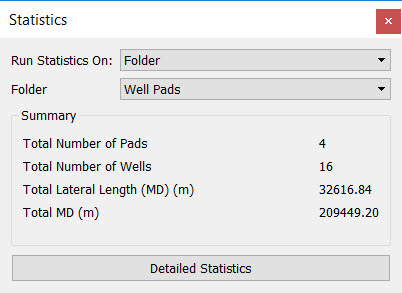 The Statistics dialog box displays statistics on an area of interest, a well pad folder, or a target. Click the Detailed Statistics button to see the statistic on each individual leg of the well used to compile the statistics summary.
Run Statistics On: Select the data on which to gather statistics.
AOI: Gather statistics within an area of interest. Click Select From Map and then drag your mouse in the display window to generate Min and Max X and Y extents. If a platform is fully or partially contained within an AOI, statistics are generated for all of the wells associated with the platform.
Folder: Gather statistics for all of the well pads contained within the selected folder.
Target: Gather statistics for all of the wells associated with the selected target.
Statistics Summary
Total Number of Pads: The total number of pads from which statistics were gathered.
Total Number of Wells: The total number of wells from which statistics were gathered.
Total Lateral Length (MD): The total length of the lateral portion of the wells in measured depth using depth units.
Total MD: The total length of the wells in measured depth using depth units. Length is measured from the platform to the toe.
Detailed Statistics: Open the Detailed Statistics window to see all of the data used to compile the statistics summary, including kick off, heel, and toe points as well as length statistics. Click  create a comma delimited ASCII file containing all of the information in the table.
— MORE INFORMATION

|
Copyright © 2020 | SeisWare International Inc. | All rights reserved |