Field Development Tool: Create New Project
The Create New Project dialog box is used to create a new project that will be hosted on a SeisWare Data Server. Once you have created a project, other users can attach to the project if they have created a connection to the server.
Note: If you are using Field Development Tool with Geology or Geophysics, this window will not be available. Please use the tools found on the Main Launcher.
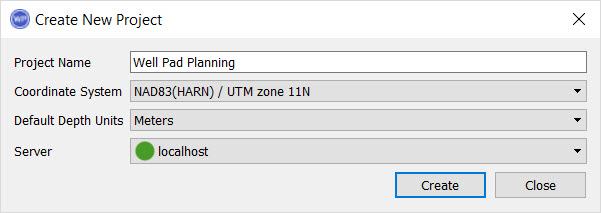 Project Name: Enter a name for the project. This will become the name of the project folder which will be saved to the location specified on the Defaults tab in theData Service Configuration window.
Coordinate System: Specify the coordinate system for the project. This is important as a project reference and when importing data.
Default Depth Units: Specify the default depth unit for the project.
Server: Select the server that will be used to host the project.
— MORE INFORMATION

|
Copyright © 2020 | SeisWare International Inc. | All rights reserved |