File Menu: Access application, license, and server configuration options. Some options are only available if you are using 10Duke licensing.  See File menu options...
File Menu Options
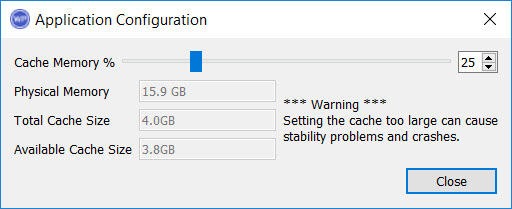 Configure: Open the Application Configuration dialog box to configure the memory use settings for the application.
Cache Memory: Use the slider to determine the percentage of memory that can be used to cache data. Use the Physical Memory, Total Cache Size, and Available Cache Size informational fields to determine the amount of memory being used.
Import Data: Open the Data Importer window to add well, culture, grid, and raster data to your project.
Server Config:Open theField Development Tool Data Server Config window to attach an existing project to the data server, and configure the default settings for new projects being hosted on the server.
License Utility: Open the License Configuration window to configure your license and view license information including expiry date.
License Manager: Open the License Manager window to view live license distributions for your organization.
Checkout Licenses: Open the Checkout Licenses window to check out a licenses for offline use.
Load License File: Navigate to and select a license file (.swlic) to load for offline use.
Swap User: Logs off the current user and allows another user to sign in.
Multi-User Login Mapper: Open the Multi-User Login Mapper window to link user's Windows logins with thier 10Duke login.
Exit: Close the Field Development Tool application.
Project Menu: Create new projects, open to existing projects, and open the Project Properties dialog box to view a list of projects and edit their properties. Note: This menu is only available with a standalone license. See Project menu options...
Project Menu Options
Open: Open the Open Project dialog box to open a connection to a server and attach to an existing project located on a server with a data connection.
Properties: Open the Project Properties dialog box to see a list of projects that you can open, and to open Create New Project and Attach Project dialog boxes.
New: Open the Create New Project dialog box to create a new project.
Close: Closes the currently selected project.
User Properties: Open theUser Properties dialog box to see a list of users in the project along with their role.
Field Plan Menu: Create field plans and view their properties. See Field Plan menu options...
Field Plan Menu Options
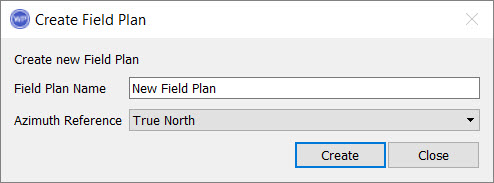
New Field Plan: Open the Create Field Plan dialog box to create a new field plan. You will be prompted to enter a name and , True North or Grid North.
Properties: Open the Field Plan Properties dialog box to add, delete, or open a field plan. To change the name of a field plan, click on the name in the Name column, and then type the new name. Note: Deleting a field plan is permanent and cannot be undone.

Scene Menu: Create and copy scenes, and access data selection tools. See Scene menu options...
Scene Menu Options
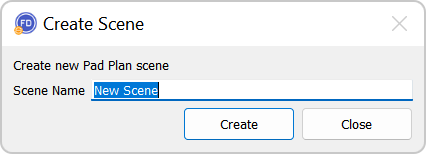 New Scene: Open the Create New Scene dialog box to create a new scene. You will be prompted to enter a scene name. You can also create a new scene from the shortcut menu in the Scene dialog box.
Copy Scene: Copy the current scene. The new scene will have " - copy" appended to the end of the original name.
Data Selection: Open the Data Selection dialog box and add or remove data objects from the scene tree.
Target Menu: Open the Target Properties dialog box to add, edit and delete targets, and define their properties including colors and clipping polygons.
Well Menu: Open the Well Properties window to view, copy and delete well information. Note: This menu is only available with a standalone license.
Culture Menu: Open the Culture Properties window to view, copy and delete culture data. Note: This menu is only available with a standalone license.
Grid Menu: Open the Grid Properties window to view, copy and delete grid information. Note: This menu is only available with a standalone license.
Raster Menu: Open the Raster Properties window to view, copy and delete well information. Note: This menu is only available with a standalone license.
View Menu: Turn dialog boxes on and off. See View menu options...
View Menu Options
Field Plan Toolbar: Turn the Field Plan Toolbar on or off.
Project Toolbar: Turn the Project Toolbar on or off.
Object Tree: Turn the Scene Tree dialog box on or off. The dialog box will reopen in the same location as when it was turned off.
Object Properties: Turn the Object Properties dialog box on or off. The dialog box will reopen in the same location as when it was turned off.
Scenes: Turn the Scenes dialog box on or off. The dialog box will reopen in the same location as when it was turned off.
Statistics: Turn the Statistics dialog box on or off. The dialog box will reopen in the same location as when it was turned off.

