Curve Aliasing
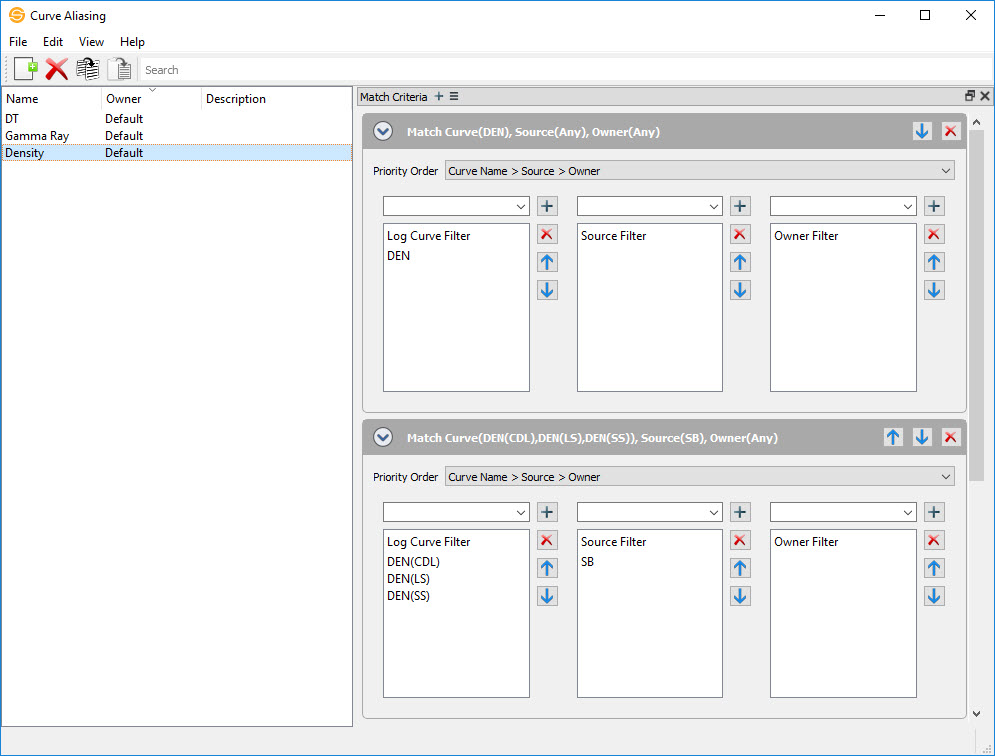
The Curve Aliasing application allows you to create, edit, and delete curve aliases. Curve aliases are used to help manage a variety of log curves for display in applications such as the Log Editor and 2D Modeling/Cross Section and act as a substitution list.
General Information
 How do I create a curve alias?
-
Click
 to create a new curve alias.
 - Name the curve alias.
-
Using the Match Criteria on the right side of the dialog, specify the priority order for your curve alias.
-
Select the log(s) you would like to use in your curve alias.
Note: You can either use the drop down to select individual curves or use "*" and "%" to match many characters or "_" and "?" to match single characters in your log curve name.
- Select the Sources and Owners, if any, you would like to include in your curve alias.
Match Criteria
The Match Criteria widget is where you can create and delete match criteria. For each match criteria, you can specify Curves, Sources, and Owners that will be used for your curve alias.
Menus
The menus at the top of the window contain tools to manage your data, change the appearance of the dialog, access help information, and close the dialog.
Toolbars
The Edit Toolbar allows you to quickly create curve aliases.
Edit Toolbar

Create New: Creates a new alias.
 Delete: Deletes the selected alias(es).
 Copy: Copies the selected alias(es).
 Paste: Pastes the selected alias(es).
— MORE INFORMATION

|
Copyright © 2020 | SeisWare International Inc. | All rights reserved |