Multi-User Login Mapper
The Multi-User Login Mapper allows you to link a user's Windows login with their 10Duke login and update all of your projects' users with their 10Duke logins. This is a vital step in ensuring that users can continue to access their multi-user projects when switching over to 10Duke licensing. Note: This tool is only visible to users with administrator privileges.
Please note that this operation is only performed on projects that are attached to SeisWare on the machine running the mapper. For projects that are not on that machine's Project List, the mapper will need to be rerun with those projects attached.
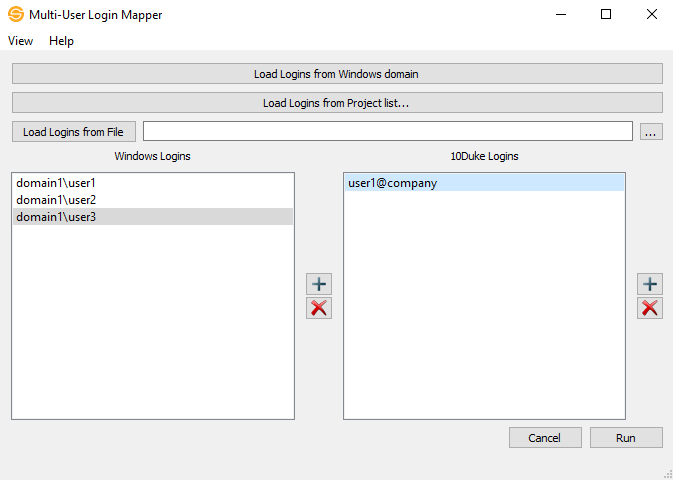
 How do I use the Multi-User Login Mapper?
- Under Windows logins, add or delete users that you want to map.
- When you click on a user under Windows Logins, the 10Duke Logins will fill in with the associated 10Duke login for that Windows user.
- Add or Delete 10Duke logins that will be associated with the selected Windows login.
- Repeat steps 2-3 until you are satisfied with your final user list and associated logins.
- Click Run to run the mapper.
Populating the User List
Aside from manually defining every user's windows login and associated 10Duke email, there are 3 ways to populate the user list:
Load Logins from Windows domain.
The mapper will scan the entire Windows domain, and populate the list with every account found. Note, this can take a long time if a domain has a significant number of accounts.
Load Logins from Project list.
Populate the list with the users from a specific SeisWare project.
Load Logins from File
A list of specific users can be loaded off a single columned text file in the format of domain\username.
Windows Logins
Lists the Windows logins for users that you want to map. Use the  to add a login and
  to delete the selected login. Note: The application will automatically list all users under the same active directory as the current user.
10Duke Logins
Lists the 10Duke logins for users that you want to map. Use the to add a login and to delete the selected login.
Load Additional Logins from Projects
Load user logins from specific projects that you would like to map.
Menus
View
By 10Duke Logins: View by 10Duke logins. When you select a 10Duke Login, the Windows Logins will populate with known Windows logins for the selected 10Duke user.
By Windows Logins: View by Windows logins. When you select a Windows Login, the 10Duke Logins will populate with known 10Duke logins for the selected Windows user.
Help
Help: Open the Help files for the Multi-User Login Mapper tool.
About: Provides general information about the current version of the Multi-User Login Mapper tool.
About Qt: Provides general information about the version of Qt the Multi-User Login Mapper tool uses.
— MORE INFORMATION

|
Copyright © 2020 | SeisWare International Inc. | All rights reserved |