Grid Import
The Grid Import dialog allows you to import grid files from other sources.
 How do I import a grid?
-
Select the Input Files for import using the
 button.
 -
(Optional) Specify a Grid Name and Description for the grid by highlighting it in the Input Files table and typing the information into the fields.
-
Click
 to import.
General Information
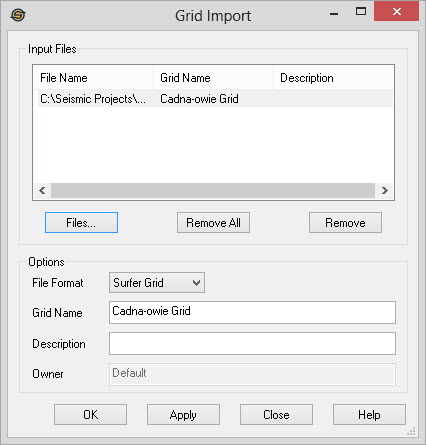
Input Files
Specify files to import.
Files:
Bring up a file selector dialog to choose files for import.
 Remove
All: Remove all the files from the
Input Files list.
Remove
All: Remove all the files from the
Input Files list.
 Remove: Remove
selected file(s) from the Input Files list.
Remove: Remove
selected file(s) from the Input Files list.
Options
File Format: Specify the format of the input
files.
- Photon Binary: These are binary files from SeisX projects. They typically have the suffix .grid.
- Photon ASCII: This is the text export format from SeisX.
- Surfer Grid: These are files from the Surfer gridding and contouring package. These files may be binary or ASCII. They typically have the suffix .grd.
- GXF Grid: These are Grid Exchange files. It is a generic text format that is intended to be portable across a variety of applications. They frequently have the suffix .gxf.
- ZMAP+ Grid: These are a ZMAP+ ASCII formatted grid files. They typically have the suffix .fmt.
Grid Name: Specify a name for the selected Input File. SeisWare automatically determines a grid name from the file name. You can override this by selecting a single Input File and typing in the name here.
Description: You can specify an optional description for the grid. Select a single Input File and type in a description. The description will appear in the Grid Properties dialog.
Owner: Displays the owner that will be
assigned to the file after it has been imported.
— MORE INFORMATION

|
Copyright © 2020 | SeisWare International Inc. | All rights reserved |