Automatic Mistie Analysis: Dual View
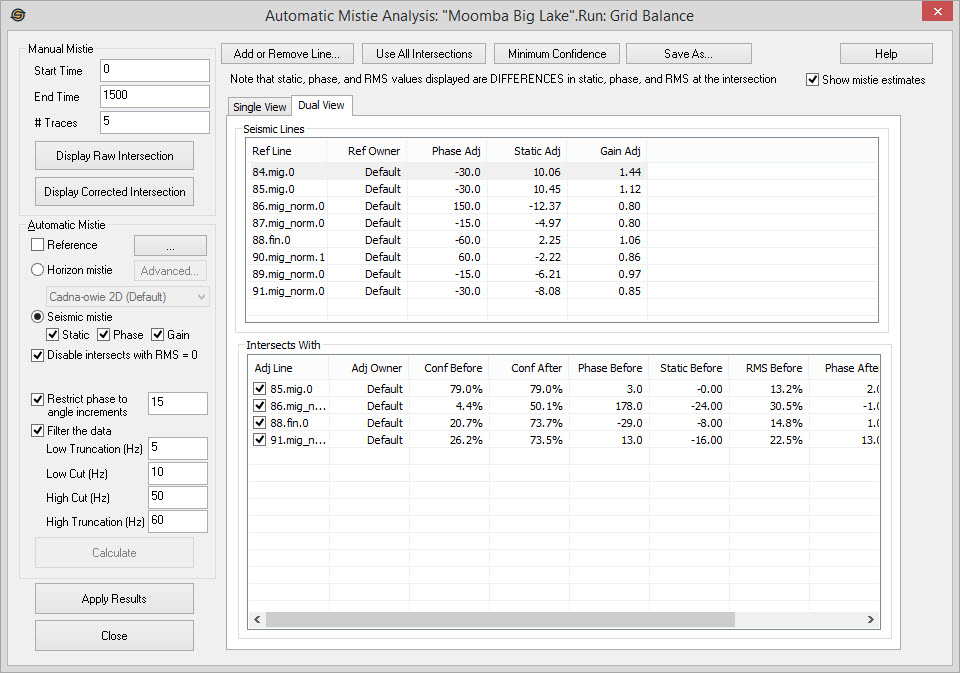
Selecting the Dual View tab changes how the lines and intersections are
displayed. Instead of a single list containing every intersection in
the analysis, there is a list of all selected seismic line. When any
line is selected from the Seismic
Lines list, a list of lines that intersect that line displayed
in the Intersect With
list.
Dual View
Dual View shows the adjustments that will be made to individual lines,
as well as the adjustment that will be made to all intersecting lines.
Seismic Lines: A list of all the lines selected for analysis. If the calculation has been completed you will see the phase, static and RMS adjustments suggested by the mistie calculation.
Intersects With: When a line has been
selected
from the Seismic Lines list,
you will see a list of all the lines that intersect the selected line,
as well as the static, phase and RMS differences between the two
line before and after the mistie calculation.
Automatic Mistie Options
— MORE INFORMATION

|
Copyright © 2020 | SeisWare International Inc. | All rights reserved |