Import Culture: Layer Object Properties
Use the Layer Object Properties page to set or override the display properties for all of the objects being imported. Some file types will have object properties embedded within the import file, and in some cases different objects in a single file will have different properties. Setting the layer properties on this page will override all of the properties information within the import file. Some file types, such as columnar ASCII and Shapefiles, don't contain any properties information, so you need to set the layer properties for these files.
Customize Points as a Layer
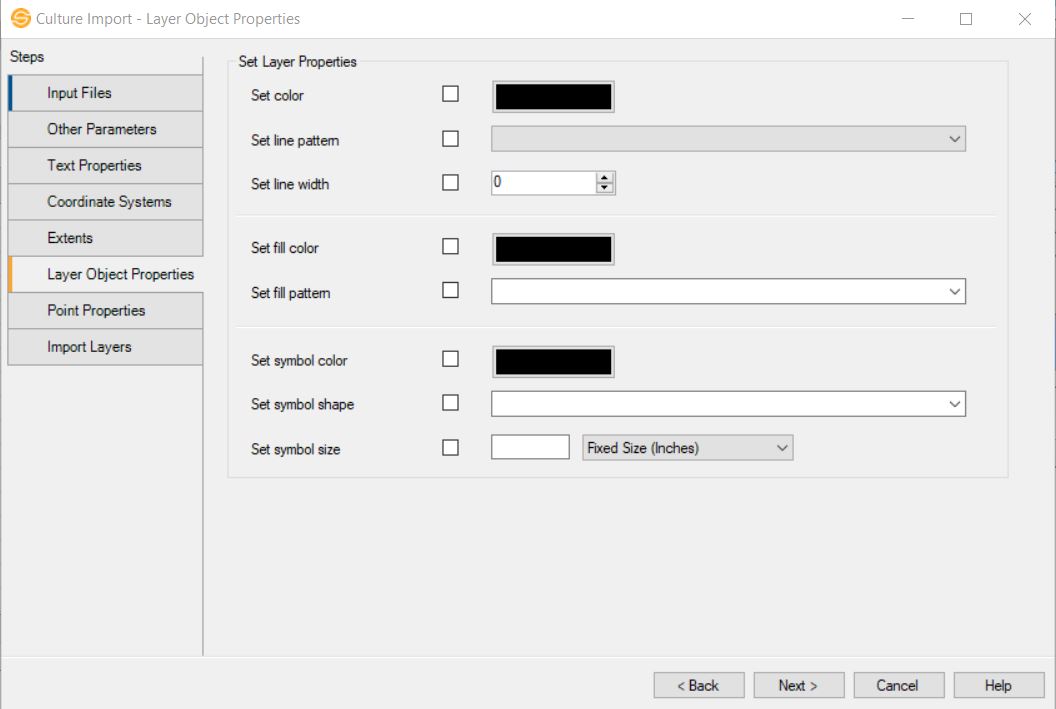
Line Properties
Set Color: Turn this on, and select a color for the lines. This does not change the color of text.
Set Line Pattern: Turn this on, and select a line pattern.
Set Line Width: Turn this on and enter a line width in pixels. Enter "0" for the thinned possible line.
Fill Properties
Set Fill Color: Turn this on a select a fill color for all of the closed polygons within a layer. When a fill color is selected, all closed polygons will be filled.
Set Fill Pattern:Turn this on and select a fill style for all of the closed polygons within a layer.
Symbol Properties
Set Symbol Color:Turn this on and select a color for the symbols. Any points not joined by lines will be treated as symbols.
Set Symbol Shape:Turn this on a select a shape for the symbols.
Set Symbol Size: Turn this on and specify a height for the symbols in fixed size (inches) or variable size (map units).
— MORE INFORMATION

|
Copyright © 2020 | SeisWare International Inc. | All rights reserved |