Windowing Methods
When performing a Wavelet Analysis, or a Seismic Zone Attribute
calculation you need to define a window to determine the data to be used in the calculation. There are four different options explained below.
Note:
Offset
values can be positive or negative. The value is added to the reference
so a negative time will move above and a positive value will move below
the reference.
Windowing Methods
- Define By Single Horizon
- Define Using Vertical Range
- Define Between Horizons
- Define
Between
Horizon and Datum
Define By Single Horizon
Use
a single horizon and offsets to select a range of data. A negative value will be shallower than the horizon, and a positive value deeper.
Top Offset (ms): Value added to "Horizon" time or depth used to define the start of the range.
Bottom Offset (ms): Value added to "Horizon" time or depth used to define the end of the range.

Define Using Vertical Range
No horizon is required to select a range of data.
Bottom Vertical Measurement: End value of your window. This may be time or depth depending on your inputs.

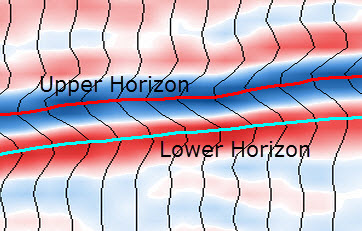
Define Between Horizons
Use an Upper Horizon and Lower
Horizon with optional offsets to define the window over which the
calculation will be
performed. The wavelets defined will be stretched or
squeezed over the zone
as it changes in length.
Upper Horizon Offset: This is an offset that will be added to "Upper Horizon" to define the beginning of the range.
Lower Horizon: The bottom horizon to be used with the offset to define the end of the range.
Lower Horizon Offset: This is an offset that will be added to "Lower Horizon" to define the end of the range.
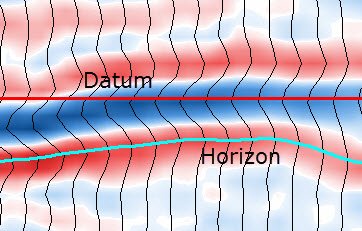
Define Between Horizon and Datum
Specify a horizon with optional offset, and a datum to select a range.
Horizon Offset: This is an offset that will be added to "Horizon" to define the range.
Datum: A fixed time or depth used to define the range.
— MORE INFORMATION

|
Copyright © 2020 | SeisWare International Inc. | All rights reserved |