License Viewer
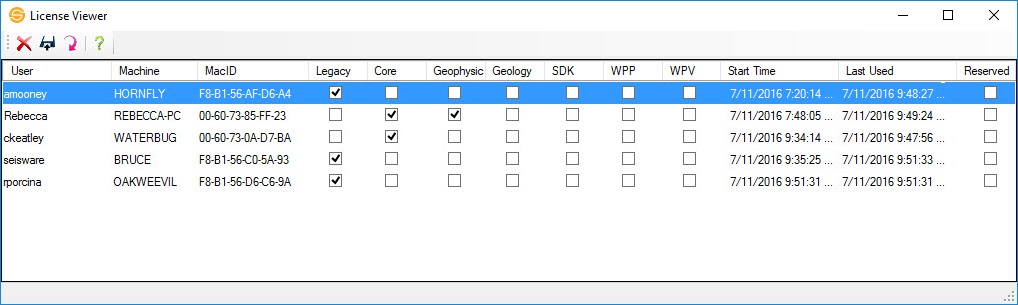
The License Viewer window provides information about the floating licenses that are currently in use. Note: The license administrator my not allow users to open this dialog box, and that licenses can only be freed up from the remote server machine.
Reserved License Operations
 Delete License: Delete the selected license. The User associated with the license will no longer be able to use the software. This operation can only be
performed from the remote license server.
Delete License: Delete the selected license. The User associated with the license will no longer be able to use the software. This operation can only be
performed from the remote license server.
 Save: Save the reserved license table to a .csv file.
 Refresh: Query
the license server for the most current license information.
Refresh: Query
the license server for the most current license information.
 Help: Open the help documentation for the License Viewer.
Reserved License Table Columns
When the License Viewer window is opened from the remote license server, individual components can be released, allowing another user to access them. Click to update these columns.
User: The name of the user accessing a license component.
Machine: The name of the machine associated with the User.
Mac ID: The unique Mac ID associated with the Machine.
Legacy: The User is accessing a Legacy license.
Core: The User is accessing a Core license.
Geophysics: The User is accessing a Geophysics license.
Geology: The User is accessing a Geology license.
SDK: The User is accessing an SDK license.
Start Time: The time the first license associated with the User was accessed.
Last Used: The
last time the license was last verified. This time may be off
by
several minutes because verification only happens periodically. Click to update this column.
Reserved: This
column indicates if the license is reserved.
Used Licenses
The status bar at the bottom of the dialog box indicates the total number of licenses, and the total number of used licenses, separated by license type.
— MORE INFORMATION

|
Copyright © 2020 | SeisWare International Inc. | All rights reserved |