Automatic Mistie Analysis: Advanced Horizon Mistie Adjustments
When applying a horizon mistie, you can choose to apply the changes to either the seismic data or the horizons as described.
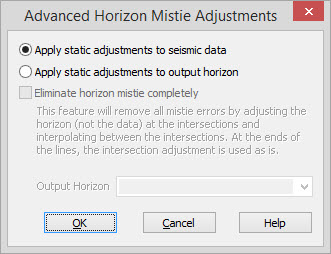
Apply Static Adjustments To Seismic Data: Applies the solution to the seismic data by adjusting the bulk shift of each seismic line involved. These shifts are written to the database so no new processing is required. Note: This is the typical way to resolve these ties.
Apply Static Adjustments To Output Horizons: Applies the results to the horizons by adjust each trace. It's always a good idea to output to a different horizon than the one used for input.
Eliminate Horizon Mistie Completely: The biggest advantage of applying the solution to horizons is that you can also completely eliminate the Mistie. This is done by linearly interpolating the residual error adjustments between each intersection and applying that result in addition to the bulk adjustments computed by the least squares solution.
Automatic Mistie Options
— MORE INFORMATION

|
Copyright © 2020 | SeisWare International Inc. | All rights reserved |