Grid Smoothing/Attributes
The Grid Smoothing/Attributes application allows you to run a smoother across a grid or calculate an attribute over the surface. The same operations can be performed on horizons so they do not have to be gridded first.
 How do I smooth a grid?
-
Select the grid(s) that the operation will be performed on.
-
Select the Operation.
-
Set the Grid Size to be used when performing the calculation.
-
(Optional) Select a polygon to restrict the geographical extents of the operation.
-
Click
 to launch the Output Grid Names dialog.
 -
Set the Output Grid Names.
-
Click
to generate
the smoothed horizon or the attribute horizon.
General Information

Grids
Select the grids you want included in the smoothing or attribute operation. Left click to select a grid, or use the Ctrl key on your keyboard to select multiple grids, and then use the selection arrows to move the grids to the Selected list. Alternately, you can move a single grid to the Selected list by double clicking on it.
To to help you make your grid selections, you can sort any column
by left clicking
on the column header, you can apply a filter ( ), or you can type a search string
into the search
bar to limit the list using
Name, or Owner information.
), or you can type a search string
into the search
bar to limit the list using
Name, or Owner information.
For additional selection and navigation options right click on the list
of grids to access
the shortcut
menu.
Operations
Specify the operation
to perform on
the grids. More than one operation may be selected, but each operation
will produce a separate output.
Parameters
Grid Size: This specifies how many grid points to use in either direction. A value of 3 means use one to the left and one to the right of the grid point. This should always be an odd number.
Interpolate Missing Values: This option specifies how to handle null values in the grid. If not selected any grid cells that are null, will remain null. If selected, grid cells that are null will consider the surrounding grid values, making gaps smaller.
 Polygons:
Open the Select Polygons dialog
and select inclusion or exclusion
polygons to restrict the geographical extents of the smoothing or
attribute operation. Only picks within the constrained zone will be
smoothed,
although
values outside of the polygon constraints may be used to calculate
the pick values.
Polygons:
Open the Select Polygons dialog
and select inclusion or exclusion
polygons to restrict the geographical extents of the smoothing or
attribute operation. Only picks within the constrained zone will be
smoothed,
although
values outside of the polygon constraints may be used to calculate
the pick values.
Apply
Clicking
will open the
Select Output Grid Names dialog.
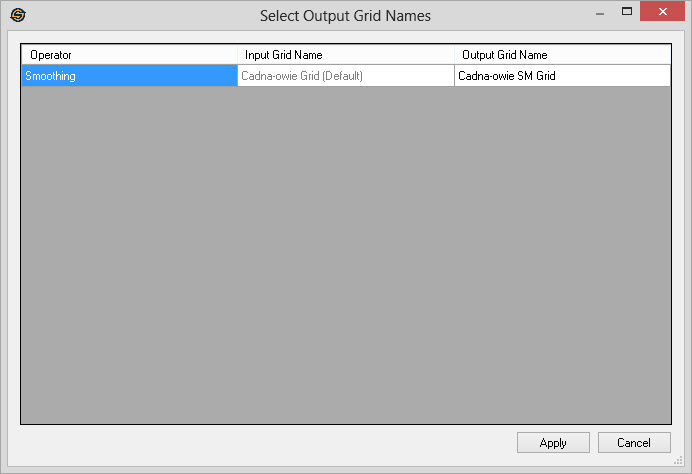
Operation: A list of all of the operations that you selected in the main dialog.
Input Grid: A list of all input grids that you selected in the main dialog. This field is for information and cannot be edited.
Output Grid:
S list of names for the
output grids. By
default a suffix ("SM","DIP","GRD","AZM","EDGE","DIFF",or "LAP") will
be attached, depending on the operation selected, to the name of each
grid to create the output grid. You can type in a new name
for each of the grids, or select the name of an existing grid from the
drop down. If you wish you can even overwrite the original
grid. This is useful when you want to iteratively smooth a
grid.
— MORE INFORMATION

|
Copyright © 2020 | SeisWare International Inc. | All rights reserved |