Well Import
Well Import is a wizard based application used to import general well data, formation tops, well logs, raster logs, productions data, and directional surveys into your project in a variety of formats.
 How do I import a well file?
-
Select the file for import using the
 button to browse to the file
location. Set
the input file type and click next.
button to browse to the file
location. Set
the input file type and click next. -
Specify the type of data being imported. If importing a columnar ASCII format file, define columns.
-
Set the parameters for import. There are different options for tops/formations, LAS files, log curves, velocity curves and production data, and directional surveys.
-
Set the final import parameters. Note: If you are importing XY data, the correct zone must be specified for correct latitude and longitudes to be stored in the database.
-
Click
 to import the wells.
General Information
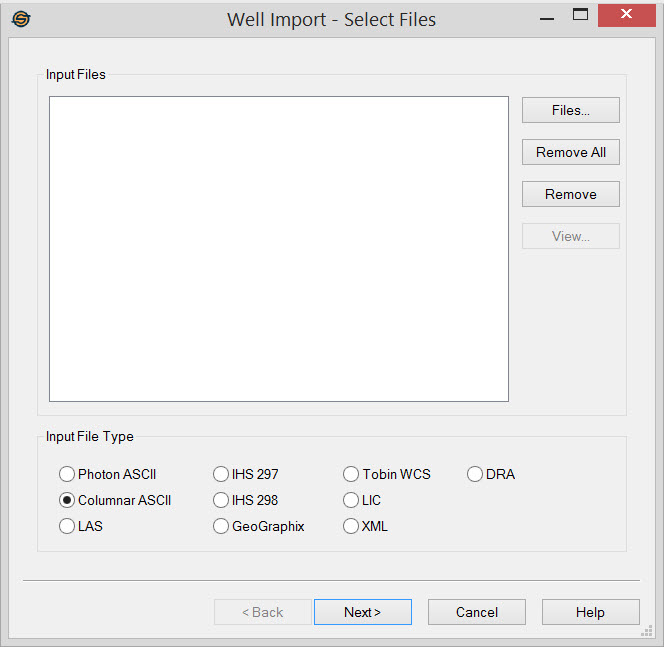
Input Files
Display a list of well files to import.
Files:
Select the files that you want to import into your project. When you are importing multiple files, they all need to be in the same format.
 Remove
All: Remove all files from the list.
Remove
All: Remove all files from the list.
 Remove:
Remove selected files from the list.
Remove:
Remove selected files from the list.
 View:
Open the selected file in a text viewer. This option can be useful when you need to inspect
files manually to determine what format they are in.
View:
Open the selected file in a text viewer. This option can be useful when you need to inspect
files manually to determine what format they are in.
Input File Type
Select the format type of file(s) you are importing.
Photon ASCII: Import a SeisX formation well file. It can contain all types of data including general well data, tops, curves and directional surveys.
Columnar ASCII: Import well data in a columnar text format. These files, commonly with the suffixes .csv or .txt, may contain general well information, tops, velocity curves and directional surveys.
LAS: Import a well file in Log ASCII Standard (LAS) format (*.las). These files contain curve data and, and can be used to import general well information and tops. Note: LAS 2.0 and 3.0 can be imported however only the fields available for LAS 2.0 will be imported from an LAS 3.0 file.
IHS 297: Import a well file in IHS 297 format. This is an industry standard file for well data transfer in the United States, and may contain general well information, tops, and directional surveys.
IHS 298: Import a well file in IHS 298 format. This is an industry standard file for production data in the United States.
GeoGraphix: Import a well file in GeoGraphix ASCII version 2 format (example). This is the standard export from GeoGraphix as well as a common export format from many other packages, and may contain general well information, formation tops and directional surveys.
Tobin WCS: Import a well file in Tobin Well Coordinate Service (WCS) format (*.wcs). These files contain only general well data.
LIC: Import a Petra calibrated raster log file stored in LIC format (*.lic). You will also need an associated image file, whose path you can specify on the Import Raster Log page of the Well Import wizard.
XML: Import a calibrated raster log file in XML format (*.xml). You will also need an associated image file, whose path you can specify on theImport Raster Log page of the Well Import wizard.
DRA: Import a calibrated raster log file in DRA format (*.dra). You will also need an associated image file, whose path you can specify on theImport Raster Log page of the Well Import wizard.
Well Import Options
— MORE INFORMATION

|
Copyright © 2020 | SeisWare International Inc. | All rights reserved |