Time/Depth Velocity Modeling: Well Data Points
The Well Data Points dialog box displays a list of the wells being used in the time/depth calculation for the layer currently selected in the Layers dialog box. When you have a Depth selection that doesn't require well input, this dialog box will be blank.
The Well Data Points dialog box works interactively with the Velocity Histogram dialog box, and the Cross Plot dialog box. Selecting data points in any one of these dialog boxes will highlight the corresponding data points in all of them, helping you to identify anomalies and trends. You can sort the columns in the Well Data Points table to help identify uncorrelated data points, and then use the shortcut menu to remove individual wells from the time/depth calculation for a single layer, or for all layers.
The Well Data Points dialog box can be turned off, minimized and moved to help you access the display and analysis tools available in the other dialog boxes.
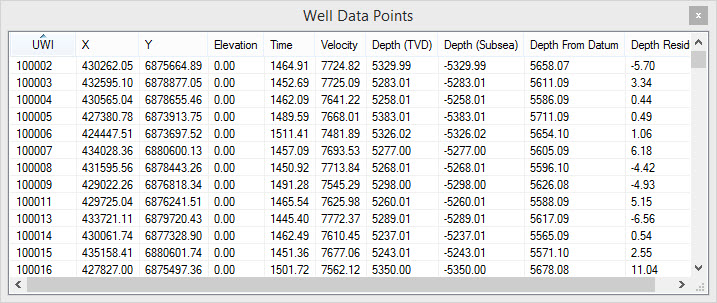
Well Data Points Columns
There are 11 columns in the Well
Data Points dialog box to help you view and analyze the
data being used in your time/depth calculation. To sort the data in
each column, click on the column header.
UWI: The unique well identifier for the well.
X: The coordinate X value for the well.
Y: The coordinate Y value for the well.
Elevation: The datum elevation for the well.
Time: The time value at the XY location.
Velocity: The calculated velocity value at the XY location. This is used to produce the velocity grid.
Depth (TVD): The TVD depth of the formation top.
Depth (subsea): The subsea depth for the formation top. This is calculated by subtracting the Depth (TVD) value from the Elevation.
Depth From Datum: The depth of the formation top with respect to the seismic datum.
Depth Residual: The difference between the formation top value, and the interpolated depth value of the final grid.
Compaction Slope: The
calculated compaction factor (K value) used to create the final depth
grid. This field will only contain data when Use compaction is
turned on the Advanced Options tab
of the Layer Details dialog
box, and the well has been selected in the Log Preview dialog
box.
Shortcut Menu
Right click on the Well Data Points table to open the shortcut menu.
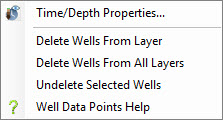
 Time/Depth Properties: Open the Properties dialog box,
used to define the gridding method and bounds for the
calculations, and select the data to use.
Time/Depth Properties: Open the Properties dialog box,
used to define the gridding method and bounds for the
calculations, and select the data to use.
Delete Wells From Layer: Remove selected wells from the time/depth calculations for the layers selected in the Layers dialog box. Use the Ctrl key to select multiple wells in the Well Data Points table.
Delete Wells From All Layers: Remove selected wells from the time/depth calculation for all layers. This will remove the well from the Selected list on the Select Seismic tab in the Properties dialog box. Use the Ctrl key to select multiple wells in the Well Data Points table.
Restore Wells: Restore deleted wells to the time/depth calculations for the layers selected in the Layers dialog box. Note: This will not restore wells that were removed from all layers. These need to be re-selected from the Select Seismic tab in the Properties dialog box.
Also See
— MORE INFORMATION

|
Copyright © 2020 | SeisWare International Inc. | All rights reserved |