Batch Seismic Rename
The Batch Seismic Rename utility allows the user to rename seismic lines and files.
 How do I rename seismic lines?
-
Select Rename seismic lines.
-
Select the Seismic Lines to be renamed.
-
Type the new names for the lines in the New Line Namecolumn. Note: You can import a list of new line names from a columnar ASCII file. Use the
 button to select the file. Click
the Define Columns button
to define the Original Line Name
and New Line Name
columns.
button to select the file. Click
the Define Columns button
to define the Original Line Name
and New Line Name
columns. -
Click
 to rename
the seismic lines.
to rename
the seismic lines.
How do I batch rename seismic files?
-
Select Rename seismic files.
-
Select the Seismic Lines to be renamed.
-
Type the new file name for each seismic line in the New File Name column. The file name is comprised of the File Identifier, Type and Version. If you only want to change one component of the file name, you can edit the New File Identifier, New Type and New Version columns independently. Note: You can import a list of new file names or individual columns from a columnar ASCII file. Click
select the file. Click the Define
Columns button to define the columns in the file that you want to
modify. Click Next. -
Click
to rename
the seismic files.
General Information
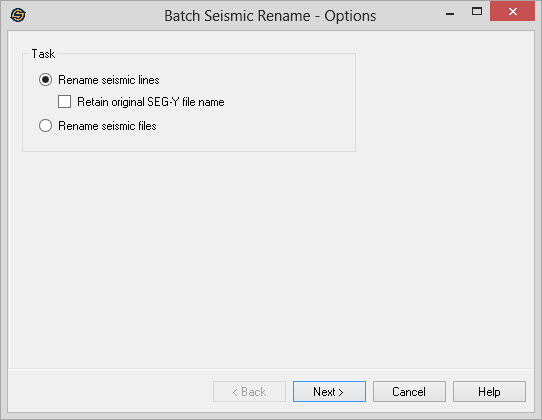
Task
Rename seismic lines:Select this task if you wish to give a new name for existing seismic lines. This is the simplest option and renames the line while maintaining links to any associated interpretation.
Retain original SEG-Y file name:Check this item to prevent the utility from renaming the associated SEG-Y files when renaming the seismic line. When left unchecked the normal behavior is to change the file name to include the new line as part of the full file name.
Rename seismic files: Select this task to rename seismic files. The line names rename unaffected. You can also use this option to change the type (e.g. MIG) or the version number of the files. This option is particularly useful when you need to specify the version zero files.
— MORE INFORMATION

|
Copyright © 2020 | SeisWare International Inc. | All rights reserved |