Data Loader: Load Columnar File
Use the Load Columnar File page to load multiple 3D lines at once. You
must first create a columnar ASCII file containing the relevant columns.
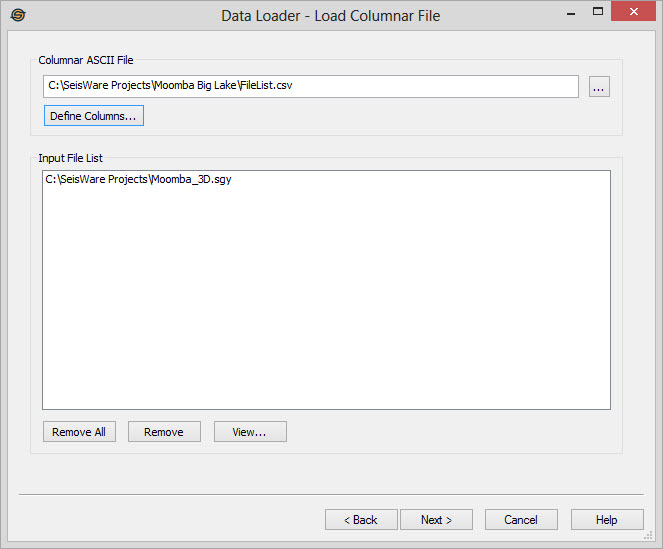
Columnar ASCII File
Select the file to be used by clicking  . Typically you can
save a .csv file from the Files Page of
the data load wizard, modify
it externally with more information and then use it in
the load.
. Typically you can
save a .csv file from the Files Page of
the data load wizard, modify
it externally with more information and then use it in
the load.
Define Columns
When using the .csv for input, you can define your parameters that
should be read from the .csv files. All information for the file should
be in the same row, and will be associated. Options include:
- File Name: Must be specified, so that the files can be loaded.
- Line Name: (Optional) Use this to specify the output Line name for the File. If not set, it will default to the File Name (before the .sgy extension).
- Description: (Optional) Use this to set a description for the file. If not set, it will be left blank or it can be set for all files on the Load Parameters page.
- Display Type: (Optional) Use this to set the Display Type. If not set, it can be set for all files on the Load Parameters page.
- Geometry File: (Optional) Use to specify the Geometry file to be used. Geometry files contain the information seen here.
- Keyword File: (Optional) Use this to specify the associated keyword file for a line. If not set, you can specify a keyword file on the Keywords page, however the same file will be used for all files.
- Version: (Optional) Use
this to set the version number
for the file. If not set, it can be set for all files on the Load Parameters page.
Input File List
After you have Defined Columns, the list of files stored in the
.csv
file list will populate this window. If you do not with to load all of
the files, you can remove some here.
 Remove All: Use
this to clear the Input File List. Remove: Use
this to remove a file off the list that does not need to be loaded.
Select the file first, and then click the "Remove" button.
Remove All: Use
this to clear the Input File List. Remove: Use
this to remove a file off the list that does not need to be loaded.
Select the file first, and then click the "Remove" button. View: Opens
the selected file in the SEG-Y viewer.
View: Opens
the selected file in the SEG-Y viewer.
— MORE INFORMATION

|
Copyright © 2020 | SeisWare International Inc. | All rights reserved |