Attribute Viewer: Active Layer Colors
The Active Layer Colors dialog box within the Attribute Viewer controls the color palette and data range for the seismic file that is currently active in the Layers dialog box.
By default, the Active Layer Colors dialog box is docked on the left side of the window, but can be resized, moved, and stacked with other dialog boxes.
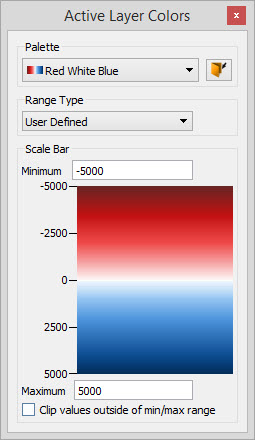
Palette: Select a palette from the list, or click the Open icon ( )
to select a SeisWare palette file (*.pal) not currently associated with
the project. There is a preview of the palette next to its name
in the list, and a preview of the palette is applied to the colorbar
and to the main seismic display as you move your cursor over the
palettes in the list. Once you select a palette, it will appear in the Scale Bar section of the dialog box.
)
to select a SeisWare palette file (*.pal) not currently associated with
the project. There is a preview of the palette next to its name
in the list, and a preview of the palette is applied to the colorbar
and to the main seismic display as you move your cursor over the
palettes in the list. Once you select a palette, it will appear in the Scale Bar section of the dialog box.
Range Type: Select the method for scaling the data in the seismic display. This will automatically be set to User Defined when you manually change the or Minimum or Maximum amplitude values in the Scale Bar section of the dialog box.
- File Peak: The seismic data will be displayed with respect to the maximum absolute amplitude value in the seismic file. If the Range Typeis changed to User Defined, selecting File Peak will restore the original Minimum and Maximum values from the database.
- User Defined: The seismic data will be displayed with respect to Min and Max amplitude values in the Scale Bar section of the dialog box.
Scale Bar: Displays the current Palette and the amplitude range it represents. The colorbar is only applied when Density Display is turned on in the Active Layer Display dialog box. The data range is used to scale both the Density Display and the Wiggle Display.
- Minimum: The minimum amplitude
value used when scaling the seismic display. Any amplitudes in the file
that are lower than this value will be assigned the minimum amplitude
value in the display. Changing this value will change the Range Type to User Defined.
- Maximum: The maximum amplitude value used when scaling the seismic display. Any amplitudes in the file that are higher than this value will be assigned the maximum amplitude value in the display. Changing this value will change the Range Type as well.
Clip values outside of min/max range: Turn this on to remove any amplitude values that aren't within the User Defined range from the display. When this is turned off, any amplitude values that don't fall within the User Defined range will be drawn with the colors from the extremes of the colorbar.
— MORE INFORMATION

|
Copyright © 2020 | SeisWare International Inc. | All rights reserved |