Zoom Window Seismic Display Properties
The Zoom Window Seismic Display Properties dialog allows the user to
set
zoom window properties independent of the main window properties.
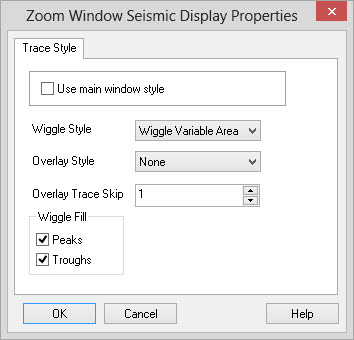
Trace Style
All the elements of the trace style are the same as those defined in
the
Trace Style tab
for the main seismic
window.
Use main window
style: When this is turned on the zoom window will use the same
trace style as the main seismic window.
If turned off the zoom
window
can have it's own style, independent of the main seismic
window.
This can be useful if you wish to examine the precise wiggle data while
looking at a variable density display in the main window.
Wiggle Style: Used to specify the visual style of the traces in the display. Styles are selected from the following:
Wiggle Style: Used to specify the visual style of the traces in the display. Styles are selected from the following:
- Wiggle: Displays the data
in wiggle trace only.
- Variable
Area: Displays the data with wiggle fills only.
- Variable
Area Wiggle: Displays the data with both wiggle traces
and filled
peaks/troughs.
- Variable
Density: Displays the data as variable color bands
representing
the data amplitudes.
- Interpolated Density: Displays the data as variable color bands points representing the data amplitudes. Similar to Variable Density but produces a much smoother looking display.
Overlay Style: Used
to specify a visual overlay for the trace. This
attribute
is only used when the Trace
Style is
set
to either "Variable Density" or "Interpolated Density". If set to
something
other than "None" an overlay will be drawn on top of the density
display.
Overlay Trace Skip: Specifies a trace spacing for the wiggle overlay. This is only meaningful when the Trace Style is set to either "Variable Density" or "Interpolated Density" and the Overlay Style is set to something other than "None". A trace will be rendered at each specified trace. For example, if the value is set to 5 you will see an overlay trace on only every 5th trace.
Wiggle Fill: Specify whether to produce a wiggle trace fill for peak values, trough values, or both. This is only used when the Trace Style or Overlay Style are set to "Variable Area" or "Wiggle Variable Area".
Overlay Trace Skip: Specifies a trace spacing for the wiggle overlay. This is only meaningful when the Trace Style is set to either "Variable Density" or "Interpolated Density" and the Overlay Style is set to something other than "None". A trace will be rendered at each specified trace. For example, if the value is set to 5 you will see an overlay trace on only every 5th trace.
Wiggle Fill: Specify whether to produce a wiggle trace fill for peak values, trough values, or both. This is only used when the Trace Style or Overlay Style are set to "Variable Area" or "Wiggle Variable Area".
Also See
— MORE INFORMATION

|
Copyright © 2020 | SeisWare International Inc. | All rights reserved |