Seismic Display Properties: Horizons
The Horizons page allows You to specify the appearance of
horizons on the seismic display.
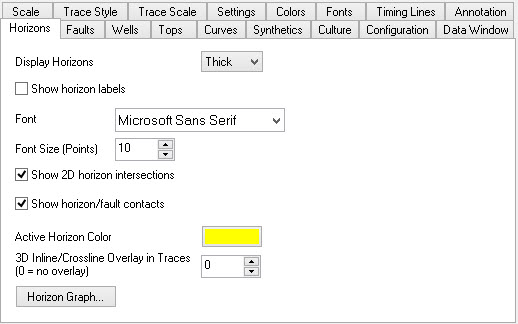
Horizon Display Properties
Display
Horizons: Turn horizons off or control their display
thickness. Choose from:
- Off
- Thin
- Medium
- Thick
Show horizon labels: Turn this item on to automatically display horizon labels in the left annotation area. If horizons are turned off, you will not see the labels.
Font: Define a font for the horizon labels.
Font Size (Points): Define the size of the font in standard font point size.
Show 2D horizon intersections: Turn this item on to automatically display horizon intersections between two 2D lines. The intersecting horizon will display as an X. If horizons are turned off, you will not see the intersections.
Show horizon/fault contacts: Turn this item on to automatically display horizon/fault contacts on the seismic section. The contacts will be highlighted with a circle around the contact in the horizon's color. If either horizons or faults are turned off contacts will not be visible.
Active Horizon Color: This control allows the user to specify the color of the active horizon. The active horizon is the horizon that is currently being edited.
3D Inline/Crossline Overlay
3D Inline/Crossline
Overlay In Traces: This
property allows you to control overlay of a shadow
horizon
when displaying 3D inlines or crosslines. When 0 is
specified no overlay horizon will be displayed. When a value
of
1 or greater is specified, all horizons parallel to the current
display for the given number of traces will be stacked and averaged
into a shadow horizon that is displayed on the current line. For
example, if you specified 5, the picks at each trace for the next
5, and previous 5 lines will be stacked together and displayed at the
average time location as a shadow horizon.
Horizon Graph Dialog
Horizon Graph: Opens the Horizon Graph dialog. This dialog allows you to set up a graph of a horizon on the bottom of your seismic section.
Also See
— MORE INFORMATION

|
Copyright © 2020 | SeisWare International Inc. | All rights reserved |