Log Editor and Cross Section: Tops Track Properties
The Tops Track Properties
control the top and zone display settings for the Log
Editor and the Cross Section. You are
able to set properties such as which tops and zones are displayed and how they are displayed.
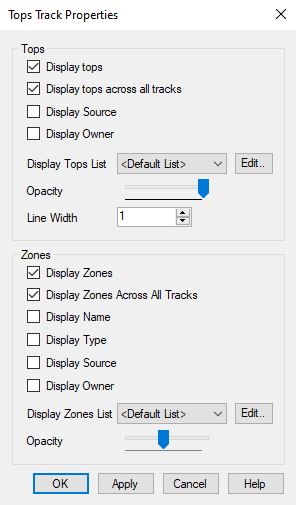
Tops
Set the appearance of tops.
Display Tops:Turn this on to display the tops track in the Log Editor.
Display tops across all tracks:Turn this on to display tops lines across all of the tracks being displayed.
Display Source: Turn this on to display source information, in brackets, next to the tops labels.
Display Owner: Turn this on to display owner information, in brackets, next to the tops labels.
Display Tops List:
Select the tops list to determine which tops will be displayed. Click  to open
the Display Tops window
to edit an existing tops list, or create a new list.
to open
the Display Tops window
to edit an existing tops list, or create a new list.
Opacity:Select the opacity for the tops labels and lines.
Line Width: Enter the width of the tops tick line in pixels.
Zones
Set the appearance of zones.
Display Zones:Turn this on to display zones in the Log Editor.
Display zones across all tracks:Turn this on to display zones across all of the tracks being displayed.
Display Name: Turn this own to display the zones names
Display Type: Turn this on to display zone types
Display Source: Turn this on to display source information, in brackets, next to the zones labels.
Display Owner: Turn this on to display owner information, in brackets, next to the zones labels.
Display Zones List:
Select the zones list to determine which zones will be displayed. Click to open
the Display Zoneswindow
to edit an existing zones list, or create a new list.
Opacity:Select the opacity for the zones labels and lines.
Also See
— MORE INFORMATION

|
Copyright © 2020 | SeisWare International Inc. | All rights reserved |