Log Editor and Cross Section: General Track Properties
The General Track Properties
control the display settings for the Log
Editor and the Cross Section. You are
able to set general display properties, such as the colors for
highlight, the units for display, the
depth grid display, and well tops.
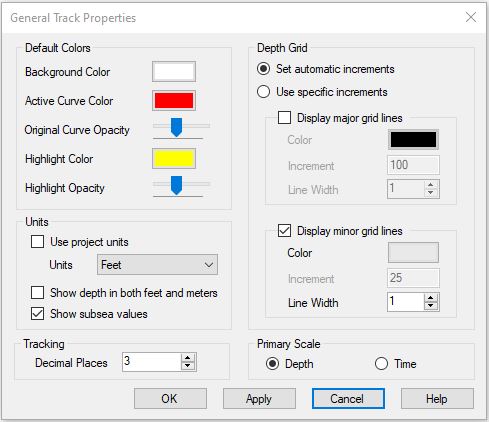
Default Colors
Specify the colors to use in the Log
Editor display.
Background Color:The default color used for the background of each track.
Active Curve Color: The default color used to draw the curve that is selected for editing.
Original Curve Opacity: The opacity of the line used to draw the original curve when you are editing a curve. The line will be drawn in the original curve color.
Highlight Color: The default color when zooming and selecting a portion of a curve.
Highlight Opacity: The opacity applied to the highlight color.
Units
Specify the depth units to use in the display.
Use Project Units:Use the depth units specified for the project in Project Properties.
Feet: Override the default depth units and use feet for tracking depth.
Meters:Override the default depth units and use meters for tracking depth units.
Show depth in both feet and meters:Display two depth tracks for both feet and meters.
Show subsea values: Display an additional depth track that shows subsea values for the well.
Tracking
Decimal Places:
The number of decimal places visible on the status bar.
Depth Grid
Set the appearance of the horizontal grid lines.
Set automatic increments: The increments for the major and minor grid lines are calculated automatically. These will change as you zoom in and out on your display.
Display Major Grid Lines: Turn on the major depth grid lines across all tracks.
Color:The
color to be used
for the major depth grid lines.
Increment:The increment to be
used for major grid lines in theunits
specified in the Units field.
Line Width:This is the width for the
major grid lines in pixels.
Display Minor Grid Lines:Turn on the minor
depth grid lines across all tracks.
Color: The color to be used for the
minor depth grid lines.
Increment: The
increment to be
used for minor grid lines in theunits
specified in the Units field.
Line Width: This
is the width for the major grid lines in pixels.
Primary Scale
Specify the primary scale, either Depth or Time.
Time: Use time as the primary scale. You must have a velocity curve to use a primary scale of time.
Depth: Use depth as the primary scale.
Also See
— MORE INFORMATION

|
Copyright © 2020 | SeisWare International Inc. | All rights reserved |