Quick Isochron
Quick
Isochron allows you to generate
an interactive horizon map. Unless Save as new horizon is turned on, the isochron generated is not written to
the disk until
necessary so as changes are made to either of the input horizons, the
map will updated with changes. This makes isochrons slower than normal
horizons. While in this interactive mode, quotation marks will appear
around the name.
 How do I perform a quick isochron calculation?
How do I perform a quick isochron calculation?Select horizons from the left and right side.
Select the calculation type -
 or
or  .
.Turn on Save as New horizon to create a permanent horizon. When left unchecked the output will update interactively.
Click
 .
The name
"Left Side Horizon" - "Right Side Horizon" will appear in the Horizon to Ribbon menu on the Basemap.
.
The name
"Left Side Horizon" - "Right Side Horizon" will appear in the Horizon to Ribbon menu on the Basemap.
General Information
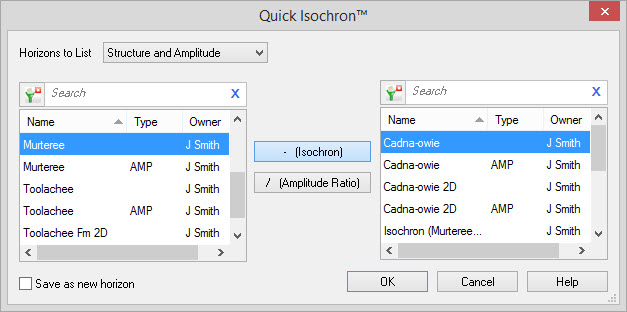
Horizon Lists
Horizons to
List: Use the drop down to
restrict the
horizon list.
Horizon List (Left Side): Select the first horizon variable to use in the calculation. To make your selection easier you can sort any column by left clicking on the column header, you can apply a filter ( ), or you can type a search
string
into the search
bar to limit the list using Name,
Type, and Owner
information.
), or you can type a search
string
into the search
bar to limit the list using Name,
Type, and Owner
information.
Horizon List (Right Side): Select the first horizon variable to use in the calculation. To make your selection easier you can sort any column by left clicking on the column header, you can apply a filter (), or you can type a search
string
into the search
bar to limit the list using Name,
Type, and Owner
information.
Horizon List (Left Side): Select the first horizon variable to use in the calculation. To make your selection easier you can sort any column by left clicking on the column header, you can apply a filter (
), or you can type a search
string
into the search
bar to limit the list using Name,
Type, and Owner
information. Horizon List (Right Side): Select the first horizon variable to use in the calculation. To make your selection easier you can sort any column by left clicking on the column header, you can apply a filter (
), or you can type a search
string
into the search
bar to limit the list using Name,
Type, and Owner
information.
Calculation
Isochron: The
final
result of this calculation is "Left Side" - "Right Side". Amplitude Ration: The final result of this
calculation is "Left Side" / "Right Side"
.Options
Save as new horizon:
When this is turned on,
the horizon
will be written permanently to disk. Once the horizon is closed you can
save the horizon by:
- Gridding or contouring the output.
- Editing the output using the Horizon and Grid editing tool.
- Reopening the dialog and recreating the horizon with "Save as
new
horizon" checked on.
Also See
— MORE INFORMATION

|
Copyright © 2020 | SeisWare International Inc. | All rights reserved |