Attribute Viewer: Active Layer Markers
The Active Layer Markers dialog box within the Attribute Viewer allows you to create color markers and apply them to the active layer of your seismic display.
By default, the Active Layer Markers dialog box is docked on the left side of the window, but can be resized, moved, and stacked with other dialog boxes.
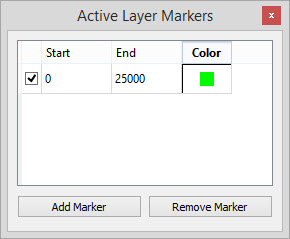
Active: A check mark in this field indicates that the marker is active. You can create as many markers as you want, and then turn them on and off to alter the display.
Start: Enter the first amplitude value in the marker range.
End: Enter the last amplitude value in the marker range.
Color: The color of the marker. To change the color, click on the color tile and select a new color from the Select Color dialog box.
 Add Marker: Add a new row to the dialog box to create a new marker.
 Remove Marker: Remove the selected marker from the dialog box. To select a marker, click in one of the cells.
— MORE INFORMATION

|
Copyright © 2020 | SeisWare International Inc. | All rights reserved |