Well Zone Merge
The Well Zone Merge dialog allows you to merge duplicate well zone entries.
General Properties
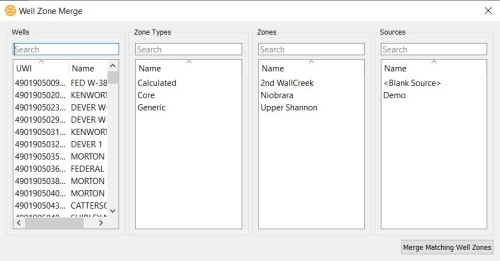
Selection Lists
Before you can merge Well Zones, you need to select items from Wells, Zone Types, Zones, and/or Sources. You can limit the information available in each list by typing in the search bar.
Wells: A list of wells available in your project.
Zone Types: A list of zone types available in your project.
Zones: A list of zones available in your project.
Sources: A list of sources associated with the project.
Operations
 Merge Matching Well Zones: Zones with matching UWI, zone name, zone type, source, owner, top depths, and base depths will be merged into a single zone entry. The purpose of this merge tool is to consolidate duplicate zones within a well that have different zone attributes into a single entry of the zone. In order to merge, the zone duplicates must have different zone attributes associated with them or if there are some zone attributes with the same name, they must have the same value in all of the zone duplicates.
— MORE INFORMATION

|
Copyright © 2020 | SeisWare International Inc. | All rights reserved |