Seismic Viewer: Distance Measurements
Use the Distance Measurements too, opened from the Seismic
toolbar, to calculate
distances and the X, Y and time directions.
 How do I measure distances in the Seismic Viewer?
Note: You can modify the units
to update the final distance measurements. Clicking
 will allow you to
start the selection process again. To undo
a process use the Ctrl+Z key
combination, or select Undo
from the Edit
menu.
will allow you to
start the selection process again. To undo
a process use the Ctrl+Z key
combination, or select Undo
from the Edit
menu.
-
Click the Measurements icon (
 ) on the Seismic
Toolbar.
) on the Seismic
Toolbar. -
On the seismic display, left click at the start of the selection and then right click to end. Note:You can keep left clicking to select multiple sections (node points will be inserted) and then right click once completed.
-
Once the line/polyline has been completed by right clicking, you can start the process again.
General Information
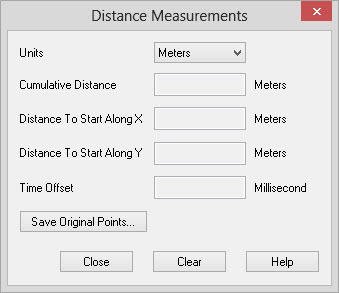
Unit Selection
Distance Measurements
Cumulative Distance: Displays the total distance of all the segments that are drawn on the seismic.
Distance To Start Along X: Displays the direct straight-line distance in the east/west direction from the first point to the current cursor position.
Distance To Start Along Y: Displays the direct straight-line distance in the north/south direction from the first point to the current cursor position.
Time Offset: Displays the time offset from
the
initial point to the current cursor
position.
For depth volumes the display will be in depth, with the units
specified.
Distance Measurements Operations
 Save Original
Points: Create a columnar file
(.csv) containing the X, Y, and Z locations of the nodes in your
distance measurement.
Save Original
Points: Create a columnar file
(.csv) containing the X, Y, and Z locations of the nodes in your
distance measurement.
Clear: Removes
any
lines/polylines that have been defined from the
seismic display.
— MORE INFORMATION

|
Copyright © 2020 | SeisWare International Inc. | All rights reserved |