Log Editor: Select
Select 
Select a portion of the curve. You will need to select a portion of a
curve to have access to certain curve editing tools that only operate
on a portion of a curve. This tool allows interaction with the Cross Plot
application. If you have the Cross Plot application
open and have curve information plotted, use this feature to highlight
samples in the Log Editor so that they highlight in the Cross Plot.
How to Select a Range of Data
- Select the curve for editing
by clicking on it.
- Click the Select
icon . An
extra toolbar will open.
- Select a range of the curve by pressing and holding the left mouse button down to select the start of the range and dragging down until you have selected the end of the range. Optionally you can refine the values by typing in the extra toolbar. Note: To remove the selection, click anywhere on the log display.
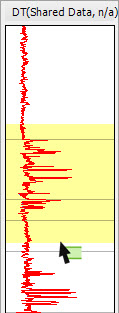
Using the Select tool to select a range of data on a curve. The selected region is highlighted in yellow.
Also See
— MORE INFORMATION

|
Copyright © 2020 | SeisWare International Inc. | All rights reserved |