Log Editor: Print Properties
Print Properties 
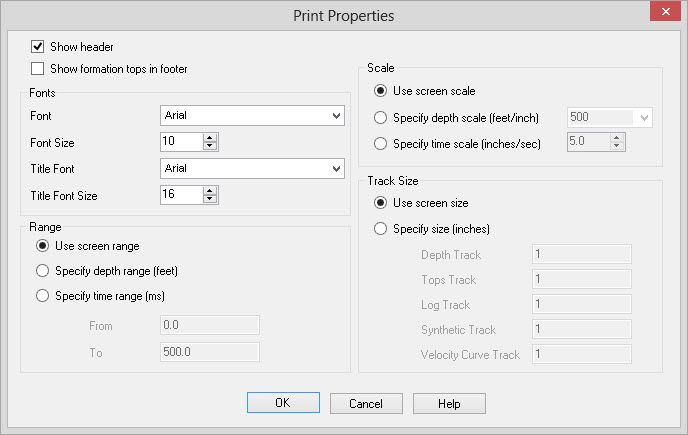
The Print Properties dialog
bogs contains the settings that control how a log curve will be printed.
Header and Footer
Show Header: Turn this on to print well information in a header above the curve display. Information includes UWI, Vertical Scale, Well Name, Elevation, and Total Depth.
Show formation tops
in footer:Turn this on to print a list of formation
tops and depth underneath the curve display.
Fonts
Font:
The default font to be used.
Font Size: The default font size to be used.
Title Font: The font used when displaying the title block.
Title Font Size: The font size that will be used in the title block.
Range
Use Screen Range: The depth range that is currently being displayed, will be the depth range that is printed.
Specify Depth Range: The depth range from and to will be output. The units for the depths are the units that have been set up for the log editor.
Specify Time Range: The time range from and to
will be output. The units are
microseconds.
Scale
Use Screen Scale: The scale that is currently being displayed will be used for output.
Specify Depth Scale: The scale that will be used when printing the template. The scale is always depth units per inch. If the units for the log editor are feet then the scale will be feet per inch and if the units are meters, then scale will be meters per inch.
Specify Time Scale: The scale that will be used when printing the template. The scale is always inches per second.
Track Size
Use Screen Size: The size for each of the tracks that is currently being displayed will be used for output.
Specify Size: The size in inches of the depth track, tops track, velocity tracks, log curve tracks, seismic tracks, and synthetic tracks that will be used on output.
Also See
— MORE INFORMATION

|
Copyright © 2020 | SeisWare International Inc. | All rights reserved |