Log Editor: Clip Left
Clip Curve Left of Value 
Removes all values below a specific value.
How to Clip Left
- Select the curve for editing
by clicking on it.
- Click the Clip Curve Left of Value
icon .
- Left click on the curve and then
select clip value. All data
with values left the location will be clipped. Note:
Use
undo to restore to the previous state.
- Save changes by pressing the
right mouse button on the
track and selecting Save
from
the shortcut menu, or by selecting the
 on
the toolbar. Type in a Curve Name
(optional
Source and Description) and click OK.
Note:
You can
overwrite an existing curve by leaving the curve
name the same as the
input.
on
the toolbar. Type in a Curve Name
(optional
Source and Description) and click OK.
Note:
You can
overwrite an existing curve by leaving the curve
name the same as the
input.
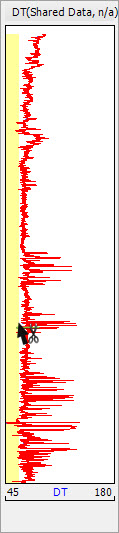
Using the Clip Curve Left of Value tool.
Also See
— MORE INFORMATION

|
Copyright © 2020 | SeisWare International Inc. | All rights reserved |